
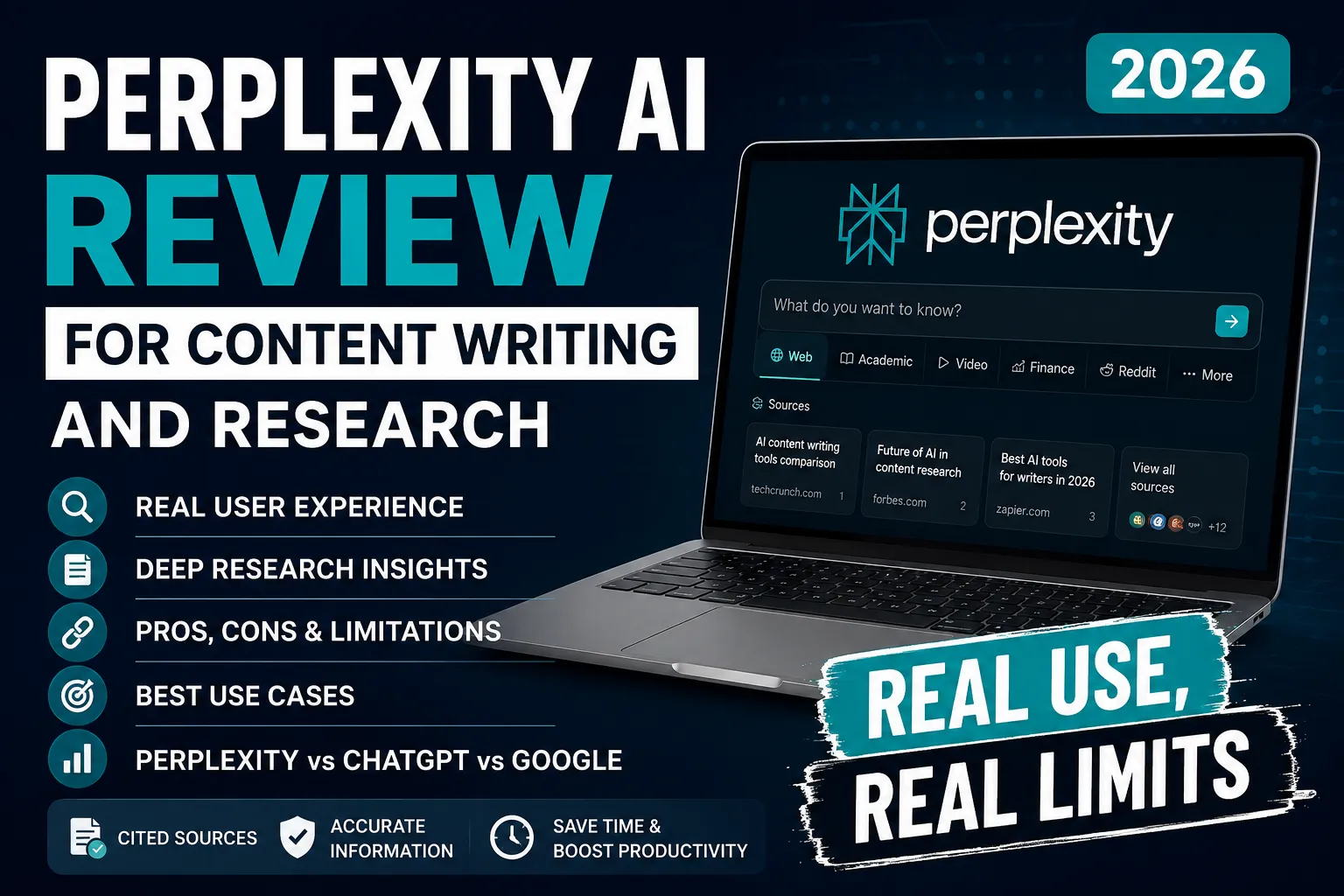
Perplexity AI Review for Content Writing and Research (2026): Real Use, Real Limits
Honestly, I almost skipped Perplexity entirely. I had already tried four or five AI tools that month, and the promises were starting to blur together. A friend who runs a software review blog kept pushing me to try it, so I finally did. Three months later, it sits in my browser toolbar right next to my keyword tool. That says more than any rating chart.
It is not designed to replace the actual writing process. Get that expectation sorted before anything else.
Quick Verdict
| Category | Rating |
|---|---|
| Research | 9.5 / 10 |
| Accuracy | 8.5 / 10 |
| Writing | 5 / 10 |
| Ease of Use | 9 / 10 |
| Value for Money | 8.5 / 10 |
| Overall | 8.8 / 10 |
What Perplexity AI Actually Does (And What Most People Miss)
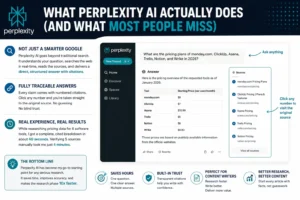
Most people hear “AI-powered search” and picture a smarter Google. That comparison does not hold up past the first five minutes of use.
Perplexity AI pulls live results, reads the pages, and gives you a direct structured answer with numbered citations attached to each claim. Click any number and you land on the original source. No filtering, no trust required up front, everything is traceable on the spot.
From my experience, that sourcing layer is the core value. While putting together a software comparison article for one of my review sites in early 2026, I needed current pricing data across six tools. Normally that means six separate tabs, six separate reads. With Perplexity, I asked one question and got a cited breakdown in about forty seconds. Cross-checking those five citations took maybe four minutes total.
Over time, I stopped treating it like a search engine. It became the thing I open before I open anything else on a research-heavy piece. If you are still in the early stages of figuring out what content writing actually involves, understanding how a tool like this fits into the research phase is a good place to start.
Focus Modes: The Part Most Reviews Skim Past
When you start a query, you can choose where Perplexity pulls from. This changes results significantly depending on what you need.
Web is the default. Open internet, general sources, works fine for most queries.
Academic pulls from research databases and scholarly publications. I used this while writing a content brief on attention span research for a productivity site. Instead of opinion blogs ranking for the keyword, it surfaced peer-reviewed studies with proper citations. The source quality jumped noticeably compared to a standard web search on the same topic.
Video surfaces relevant YouTube content and summarizes what was covered. Before writing a comparison piece on AI writing tools for one of my software review articles, I ran a video search to see how creators were framing the same topic. Helped me find angles that written content was missing.
Finance narrows to financial news, earnings reports, and market data. Anyone covering business or economics topics will find this saves real time versus manually filtering through news results.
Shopping pulls product listings and pricing. Useful when writing product roundups and you need current price ranges without visiting ten store pages.
Reddit and Social is one I reach for more than people expect. Real people, real complaints, real language. Before writing a review of a project management tool for my SaaS comparison site, the Reddit Focus Mode showed me what actual users were frustrated about in late 2025. That shaped the angle of the whole piece.
There is also a Labs section where experimental features show up before they go live broadly. Perplexity has been testing expanded file analysis and a computer use capability through Labs. Worth checking if you use the tool regularly.
After comparing several research workflows for a long-form content project, I found the Focus Mode system alone made Perplexity more targeted than switching between different platforms manually. For anyone just getting started with AI tools in general, I have a separate breakdown of the 3 best AI tools for beginners that covers the broader landscape.
Deep Research Mode: Deserves Its Own Section
Standard Perplexity answers come back in seconds. Deep Research is a completely different process.
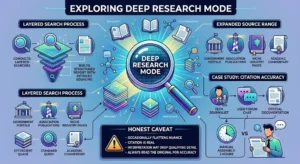
Think of it as the difference between asking a colleague a quick question and asking them to prepare a full briefing document. The mode runs for two to four minutes, conducting layered searches, reading full pages, cross-referencing what it finds, then building a structured report with detailed sourcing throughout.
What surprised me most the first time I ran it properly was how the source range expanded. Standard queries tend to surface the same top-ranking pages everyone else gets. Deep Research digs into secondary sources, government portals, association publications, and niche industry pages that take real effort to find through regular search.
While comparing AI research tools for one of my software review articles, I used Deep Research to analyze how five different tools handled citation accuracy. It pulled from academic commentary, tech journalism, user forum discussions, and official documentation pages. The brief it produced would have taken me a solid three hours to assemble manually. It took eleven minutes including my read-through.
One honest caveat: the tool occasionally flattens nuance from a source. The citation is real. The interpretation sometimes drops a qualifying detail. Always read the original when accuracy carries weight in the piece you are writing.
How the Follow-Up Thread System Actually Works in Practice
This feature sounds minor. It is not.
You ask a broad question, get a cited answer, then ask a follow-up that builds on it. The thread carries context from each previous message, so you are not re-explaining the topic each time. The research compounds with each question.
While building out a content calendar for my SaaS comparison site, I started with a query about top CRM tools heading into 2026. Then asked specifically about which ones had changed pricing in the past eight months. Then asked what users on Reddit were saying about those same tools. Each answer fed the next. By the end of that thirty-minute session, I had a research brief covering three separate articles.
One thing that became obvious early: the quality of what comes back depends directly on how specific your questions are. Vague questions get broad answers. Precise, multi-part questions get something you can actually work with. This is especially true if you are running a niche site and need research that supports a proper SEO strategy rather than just surface-level information.
What Perplexity Cannot Do (This Part Matters)
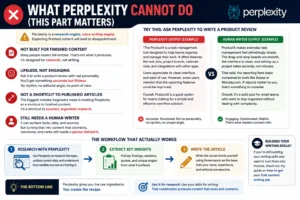
A lot of people download it expecting finished content. That is not what this tool produces, and pretending otherwise would make this review useless.
Ask it to write a product review with real personality. You get something accurate and lifeless. The grammar is fine. The structure is logical. But there is no rhythm, no editorial angle, no point of view. It reads like a summary written by someone who understood the topic and cared nothing about how it landed.
The biggest mistake beginners make is treating Perplexity as a shortcut to published articles. It is a shortcut to sourced, organized research. Very different things.
The workflow I landed on after testing different approaches across several months:
- Use Perplexity to research the topic, surface current data, understand how credible sources are framing it
- Pull key findings, statistics, and angles from what it surfaces
- Write the actual article yourself using those inputs as the base
That split produces good results. Pushing Perplexity to handle both ends does not, at least not for content that needs a person behind it. If you are still building your writing skills and want to turn them into income, I have a separate guide on how to get your first content writing job that covers the practical side of that transition.
Spaces: Better Than It Sounds on Paper
I ignored this feature for the first few weeks. Then I realized I was spending five minutes at the start of every session re-explaining the same project context. Spaces fixed that.
A Space is a persistent workspace tied to a specific topic or ongoing project. You load in background documents, set custom instructions for tone and format, and that context stays across every session. Nothing resets when you close the tab.
For a long-running review series covering AI tools that help solopreneurs work faster, I built a Space with background notes on the niche, a tone guide, a list of competitor sites I was tracking, and three uploaded PDF reports. Every query inside that Space started with all of that context already loaded. No re-explaining, no re-uploading.
Not a project management system. But for keeping research organized around a subject you return to regularly, it works better than a stack of open tabs and a notes doc running on the side.
Perplexity vs ChatGPT vs Google: Where Each One Actually Wins
People keep asking which one to use. The more useful question is which one to use for what.
| Feature | Perplexity AI | ChatGPT | |
|---|---|---|---|
| Live Web Search | Yes, always on | Limited (browsing mode) | Yes |
| Citations with Sources | Yes, every answer | Partial, inconsistent | No |
| Deep Research Reports | Excellent | Good, available | No |
| Creative Writing | Weak | Strong | Not applicable |
| Conversational Writing | Below average | Strong | Not applicable |
| Academic Source Access | Yes, Focus Mode | Limited | Partial |
| Real-Time News | Yes | Inconsistent | Yes |
| File Upload and Analysis | Yes, Pro plan | Yes | No |
| Project Spaces | Yes | Yes, Projects | No |
| Full Feature Cost | $20 per month | $20 per month | Free |
The pattern that showed up after comparing these three across real content tasks: Perplexity for sourced research, ChatGPT for writing and ideation, Google for finding a specific known page or navigating somewhere. Running them together is not overkill. They genuinely cover different jobs. If you want a deeper breakdown of how ChatGPT and Claude handle content writing specifically, that comparison is worth reading alongside this one.
Free Plan vs Pro: The Honest Breakdown
| Feature | Free Plan | Pro Plan ($20/month) |
|---|---|---|
| Standard search with citations | Yes | Yes |
| Follow-up threads | Yes | Yes |
| Deep Research mode | Very limited | Full, unlimited |
| File uploads for analysis | No | Yes |
| Focus Modes (Academic, Finance, etc.) | Partial | Full access |
| Model choice (Claude, GPT-4o, etc.) | No | Yes |
| Pro Search multi-step queries | Limited daily | Unlimited |
| Labs early access | No | Yes |
The free plan works for occasional use and for getting a genuine feel for the tool before committing.
Perplexity Pro becomes relevant once you start hitting daily limits on complex queries. That happened faster than I expected. The file upload feature was what I noticed most immediately after upgrading. Being able to load a research report, a competitor’s long content piece, or a brand document and then ask direct questions about it changed how I approach source-heavy writing.
While setting up the research workflow for my AI tools comparison site, I ran the free plan for around four weeks. Daily limits became friction by week three. The upgrade removed that and opened model switching, which matters when certain query types return better results from different underlying models.
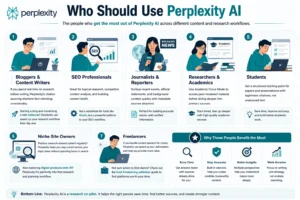
Who Should Use Perplexity AI
This fits certain work types clearly better than others. Based on actual use across different content setups, these are the people who tend to get the most out of it:
Bloggers and content writers who spend real time on research before writing. The citation sourcing shortens fact-checking considerably. If you are thinking about starting a blog and monetizing it with AdSense, Perplexity can significantly speed up your research workflow from day one.
SEO professionals using it for topical research, competitor content analysis, and building content briefs. Not a substitute for a dedicated keyword tool like Ahrefs, but a strong addition to that workflow.
Journalists and reporters who need to surface recent events, official statements, and background context quickly with traceable sources attached.
Researchers and academics who can point Academic Focus Mode at peer-reviewed material before going deeper into primary sources.
Students working on papers or presentations who need a structured starting point with legitimate citations rather than unsourced generated text.
Niche site owners who produce research-backed content regularly and need to stay current across their topic areas without spending hours in search. If you are also exploring ways to create and sell digital products using AI, Perplexity fits naturally into the research side of that workflow too.
Freelancers who handle content research for clients will find this speeds up deliverables noticeably. If you are still figuring out where to find work, the best freelancing websites guide covers the platforms worth focusing on.
Who Should Not Use Perplexity AI
Being clear here matters more than being diplomatic.
Fiction and creative writers will find almost nothing useful in it. The tool is built around factual retrieval. It has no feel for narrative, character, or emotional texture.
Copywriters after persuasive, brand-aligned text will be let down. The output is detached regardless of how the prompt is framed.
People expecting one-click article generation will likely feel frustrated quickly. Perplexity surfaces sourced information. Turning that into content that reads well still needs a writer behind it.
Users who need keyword volume data should stick with dedicated SEO tools. Perplexity does not provide search volume figures, difficulty scores, or rank tracking of any kind. Pair it with a proper tool from the beginner SEO guide instead.
Anyone focused purely on local business needs will not get much from it. For local search, nearby services, and map-based queries, standard search still handles this without question.
Accuracy: The Part That Actually Requires Your Attention
Citations do not equal correctness. Worth pausing on that for a second.
Perplexity shows you a real, clickable source. It sometimes summarizes that source in a way that drops a qualifying clause, flattens nuance, or slightly misframes a finding. The original page contains context the tool did not always carry over into its answer.
I ran into this while researching FTC disclosure rules for a content compliance piece I was writing for one of my niche sites. The citation was legitimate. The summary omitted a specific distinction about timing requirements that would have changed what I wrote in the article. When I read the original source directly, the real answer was more specific than Perplexity had condensed it to be.
The tool is transparent about sourcing. It is less reliable in interpretation. For anything where being wrong has a real consequence, click through and read the actual source. Perplexity puts that one click away. Use it every time it matters.
Pros and Cons
What works well
- Every answer includes numbered, clickable citations from real web sources
- Focus Modes let you control what type of sources the tool pulls from
- Deep Research produces thorough, multi-source reports on complex topics
- Follow-up threads build research progressively without losing context
- Spaces keep ongoing project research organized and persistent across sessions
- Pro plan gives access to multiple AI models within a single subscription
- Academic Focus Mode surfaces peer-reviewed material instead of opinion blogs
Where it falls short
- Writing output is flat and lacks voice, rhythm, or editorial perspective
- Occasionally misframes the nuance of a legitimate cited source
- Deep Research takes several minutes per query, noticeable on busy work days
- Niche topics sometimes return thinner sourcing from lower-quality pages
- Free plan limits show up quickly with consistent professional use
- No keyword volume data, rank tracking, or SEO metric integration
- Not suited for creative language, brand tone, or anything requiring persuasion

FAQs
Q1. Is Perplexity AI good for SEO content research?
Yes, for topical research and competitive content analysis it holds up well. You can surface what angles competitors are covering, what questions audiences are actually asking, and how credible sources frame a subject. What it cannot give you is keyword search volume, difficulty scores, or rank data. Pair it with a dedicated keyword tool rather than replacing one with the other. If you are building your SEO knowledge from the ground up, this complete SEO guide for beginners covers the fundamentals worth knowing first.
Q2. Can Perplexity write full blog posts?
It generates text, but the output consistently reads as flat and impersonal. After testing this across several content formats, the problem is always the same: accurate information delivered without any voice. Use it for the research layer and write the actual article yourself from what it surfaces.
Q3. How does Perplexity compare to just using Google?
For research synthesis and pulling sourced answers on a topic, Perplexity is faster and more organized than reading through ten separate search results manually. For finding a specific known page, a local business, a product listing, or navigating somewhere, Google handles it better. They are not competing for the same job once you understand what each one is built for.
Q4. Is the Pro plan worth paying for?
For regular content work involving research-heavy projects, the cost tends to cover itself in time saved fairly quickly. For occasional personal use, the free plan handles most needs. The decision usually comes down to how consistently the daily limits create friction in your actual workflow. You can review current pricing directly on the Perplexity Pro page before deciding.
Final Thoughts
After months of using Perplexity across different types of content work, including niche site articles, software comparison pieces, and topic research for client projects, the picture has settled clearly.
Strong research tool. Weak writing tool. Neither of those is a criticism. They are accurate descriptions of what it was built to do.
The writers who get the most out of it accept that framing early. They use Perplexity for the research layer, then move to their own keyboard or a writing-focused tool for the actual content. That combination works. Expecting Perplexity to cover both sides does not.
One thing that became obvious over time: the tools that actually change a workflow are rarely the most exciting ones to demo. Perplexity is not flashy. But it removed a real friction point from how I approach research-heavy pieces, and it has stayed open in my browser every single working day since.
If you are building an online presence around content, whether through freelancing, running a niche site, or launching an AI agency, building a solid research workflow early makes every article you publish stronger. Perplexity is a practical way to do that without spending your whole morning in search.
Start with the free plan on an actual project. Check whether the citations hold up when you click through them. That experience will tell you more than this review can.
This review reflects personal use of the platform over an extended period. Pricing and features may be updated by Perplexity over time. Check the official Perplexity website for current details.
 Abdullah Waheed