
How to Sell Notion Templates Online and Actually Make Money Doing It
There is a moment many Notion power users experience. You build a system for yourself, a colleague sees it during a screen share, and they say: Can I have that? It keeps happening. Eventually the question shifts not just “can I have it,” but “would you sell it?”
That shift is where this whole thing starts.
Selling Notion templates has grown from a niche side project into a real digital product category with consistent buyers and genuine income potential. Notion’s own Template Gallery lists thousands of options, and third-party platforms like Gumroad and Etsy have entire subcategories dedicated to them. Sellers who understand the process and take it seriously can build something that earns without requiring daily attention.
You do not need a design portfolio. No large audience either. What you do need is a useful system, the right platform, and a listing that speaks directly to the right buyer.
Here is how the whole thing works, from idea to first sale.
Why Notion Templates Have Become a Real Market
Notion has grown into one of the most widely adopted productivity tools available, with a user base spanning students, freelancers, creative agencies, and small business teams. According to Notion’s own public reporting, the platform serves tens of millions of users, and that number has kept climbing since personal use became free.
The purpose the templates serve is straightforward. Most people who open Notion for the first time feel completely stuck. They understand what they want to accomplish. They just have no idea how to build the system that gets them there.
That is the exact gap a well-built template fills. Not decoration. Not a pretty cover page. A working system a buyer can duplicate, customize, and actually use on day one.
The templates that sell consistently are not always the most visually impressive. Based on what performs across Gumroad and Etsy listings, the best sellers tend to be the ones solving a specific, named problem for a specific type of person. That insight alone is worth building your first product around.
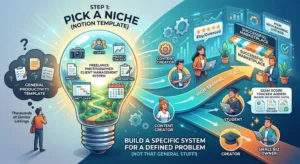
Step 1: Pick a Niche Before You Build Anything
The biggest mistake beginners make is creating a template based on personal preference, then hoping the right buyer stumbles across it. That rarely works.
Start with the buyer. Who is actively searching for a Notion system right now, and what specific frustration are they trying to solve?
Niche-specific templates consistently outperform general productivity templates across almost every marketplace. A “freelance photographer client management system” gets found by people typing that exact phrase. A “general productivity dashboard” competes with thousands of similar listings and connects deeply with very few.
Some categories where buyers show up reliably:
Freelancers and solopreneurs need project trackers, invoice logs, proposal pipelines, and client onboarding boards. Students search for revision planners, assignment trackers, linked lecture notes, and exam preparation dashboards. Content creators want editorial calendars, video production pipelines, idea databases, and brand collaboration trackers. Small business owners look for team onboarding checklists, inventory logs, meeting archives, and lightweight CRM setups. Personal finance users buy budget planners, net worth dashboards, and subscription expense trackers.
Before building anything, spend an hour on Gumroad and inside Etsy’s digital downloads category. Read buyer reviews on existing listings carefully. What do people praise? More importantly, what do they say is missing? That gap between what currently exists and what buyers want is where a genuinely strong product idea lives.
Real example: A seller noticed that reviews on several popular student planners mentioned the same missing feature: none tracked exam scores across multiple subjects over a full semester. She built a version with a linked grade tracker as a central element. Within two months, it became her highest-earning listing.
Step 2: Build Something That Works, Not Just Something That Looks Good
Buyers cannot try a Notion template before purchasing. They are trusting your screenshots and product description to represent something that will function properly in their workspace. So the product itself has to hold up the moment someone duplicates it.
Templates that try to cover too many use cases usually fall apart in practice. The navigation becomes confusing, the structure gets overwhelming, and buyers end up leaving it unused.
Pick one workflow. A weekly review system. A content production planner. A reading list with linked book notes. Build it as if you are going to use it for a real ongoing task, because that pressure forces genuine functionality over visual polish.
What separates a forgettable template from one buyers recommend to others comes down to a few specific things.
Clear structure with labeled pages and named databases. Nothing frustrates a new user faster than a page called “Database 2” or a property with no clear purpose. Every element should be named for what it actually does.
A short “Start Here” page inside the template itself. This takes less than an hour to write and significantly reduces support questions. Buyers want to feel oriented immediately, not confused on their first click.
Sample data showing the system in use. An empty database gives buyers nothing to orient around. Fill it with realistic placeholder entries so the template looks like a working product, not a blank form.
Consistent visual design using Notion’s built-in color options and text styles. Custom CSS is not needed. Clean, readable, and internally consistent is the target.
Test the template on mobile before listing it. Open it on a phone and click through every page. Many buyers use Notion on mobile regularly, and a template that breaks on a small screen generates complaints. Check column widths, confirm databases load cleanly, and make sure toggle blocks open properly on touch screens.
Check the duplicate link before publishing. Generate the shareable Notion link, then open it in a private browser window exactly as a new buyer would. Confirm that the “Duplicate page” button actually appears and that the full template, including all sub-pages and linked databases, copies correctly into a new workspace. Sellers sometimes share view-only links by mistake. Catching this before the first sale prevents unnecessary confusion.
After comparing several delivery approaches, sellers who include a short Loom walkthrough video as a bonus tend to see stronger buyer confidence. Two minutes of screen recording showing how the template works does something written documentation simply cannot: it removes the uncertainty that comes with purchasing something you cannot fully preview.
Step 3: Choose the Right Platform for Where You Are Starting
This is where many first-time sellers stall. The options are not complicated once you understand what each one actually offers.
| Platform | Best For | Fee Structure | Built-in Traffic |
|---|---|---|---|
| Gumroad | Beginners, digital products | Flat 10% per sale | Low, seller-driven |
| Etsy | Templates with search demand | Listing fee plus transaction fee | High organic search |
| Payhip | Beginners wanting lower fees | Free tier available | Low, seller-driven |
| Lemon Squeezy | Clean checkout experience | Percentage plus processing | Low, seller-driven |
| Own Website | Established creators | Payment processor fees only | Depends on your SEO |
| Notion Gallery | Visibility only, links out | Free | Medium reach |
The core difference is this: on Gumroad and similar platforms, you build the audience yourself. On Etsy, an audience already exists and is actively searching. For a deeper breakdown of how these two platforms compare on fees, traffic, and product types, this guide on Etsy vs Gumroad for digital products covers it in full detail.
Many sellers start on Gumroad to validate their idea quickly, then expand to Etsy once the listing is polished and has a few reviews behind it.
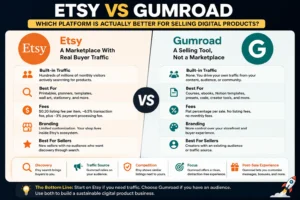
Gumroad vs Etsy: An Honest Side-by-Side Look
Gumroad
Pros: Takes roughly fifteen minutes to set up, handles payment processing and delivery automatically, supports flexible pricing including pay-what-you-want options, and makes it simple to create bundles and discount codes.
Cons: No built-in discovery. Every visitor comes from somewhere you sent them. The flat 10% fee adds up at higher volume.
Etsy
Pros: Buyers are already searching for digital downloads, which means organic traffic arrives without paid promotion. The platform carries trust with cautious buyers who might hesitate to purchase from an unknown website.
Cons: More competitive, listing fees apply per product, Etsy controls the customer relationship, and algorithm changes can affect visibility unexpectedly.
Many experienced sellers run listings on both platforms simultaneously. Etsy handles discovery from strangers. Gumroad handles the email list, returning buyers, and bundle offers. You can also explore this complete guide on how to sell on Gumroad step by step if you want a full walkthrough of setting up your first product there.
Step 4: Price for Value, Not for Volume
Pricing a digital product feels uncomfortable at first because there is no physical production cost. That absence leads most new sellers to set prices too low.
Low pricing rarely signals accessibility to buyers. More often, it signals uncertainty about the product’s value.
Many sellers report that raising prices on a well-positioned listing, while simultaneously rewriting the description to emphasize what the buyer gains, often improves rather than hurts sales. Pricing also signals the value buyers should expect before they even open the product page.
A rough framework based on what moves across the market:
Simple single-purpose templates like daily journals, habit trackers, or reading logs sit comfortably around eight to fifteen dollars. Mid-range systems with multiple linked databases and a clear operational workflow, such as a freelance project dashboard or a complete student planner, tend to work well between twenty and forty dollars. Complex multi-system packages with video documentation and ongoing updates can reasonably be positioned between fifty and ninety dollars, sometimes higher, depending on the niche.
Bundles shift the economics entirely. Three related templates packaged together at a slight discount often move faster than the same templates sold individually. Buyers who are solving a workflow problem in one area tend to want a complete solution rather than a partial answer.
One thing that becomes clear after watching this market: the sellers doing well are rarely the cheapest option. They are the clearest and most useful ones. Compete on that.
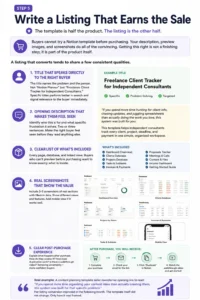
Step 5: Write a Listing That Earns the Sale
The template is half the product. The listing is the other half.
Buyers cannot try a Notion template before purchasing. Your description, preview images, and screenshots do all of the convincing. Getting this right is not a finishing step; it is part of the product itself.
A listing that converts tends to share a few consistent qualities.
The title names the problem and the person. Not “Notion Planner” but “Freelance Client Tracker for Independent Consultants.” Specific titles perform better in search and signal relevance to the buyer immediately.
The opening description identifies who this is for and what specific frustration it solves. Two or three sentences. Make the right buyer feel seen before they have read anything else on the page.
A clear list of what is included. Every page, database, and linked view. Buyers who cannot browse the product before purchasing want to know exactly what is inside.
Screenshots of real sections. Three to five images minimum, showing actual database views and filled-in entries rather than just the cover page. If the mobile layout works well, include a screenshot of that too.
A clear explanation of what happens after purchase. How does the buyer access the template? How does duplication work? Is there a walkthrough video? Removing this uncertainty reduces hesitation, especially for first-time digital product buyers.
Real example: A content planning template seller rewrote the opening line of her Etsy listing to read: “If you spend more time organizing your content ideas than actually creating them, this system was built for that specific problem.” Her listing conversion improved in the following month. The template itself did not change. Only how it was framed to the right person did.
Step 6: Reach Buyers Without a Large Audience
The first sale feels like a milestone because it proves the product is real. You do not need a large platform to get there.
Reddit works well when approached honestly. Communities like the Notion subreddit, freelancing communities, and niche productivity groups are full of people asking questions that a well-built template could answer. Contribute genuinely, answer questions, and mention your product only when it is directly relevant, not as promotion.
Pinterest is consistently underused by Notion template sellers, which is part of why it works. A clear pin with a strong template preview image can drive steady traffic to a listing for months without additional effort. Pins function like permanent search results for visual products. If you want to understand how to get the most from it, this guide on using Pinterest to drive traffic is worth reading before you start.
Short videos on YouTube or TikTok showing the template in a real workflow tend to outperform anything resembling an advertisement. People searching for Notion organization tutorials are already interested. They just need to find you.
An email list matters more than most beginners expect. Offering a stripped-down free version of one template in exchange for a signup creates an audience you own. When a new listing launches, that list hears about it before anyone else.
SEO through written content is the channel most Notion template sellers overlook entirely. Publishing articles targeting specific search phrases like “best Notion templates for students,” “Notion CRM for freelancers,” or “how to organize a content calendar in Notion” creates evergreen traffic that compounds over time. These posts rank on Google, attract buyers already researching exactly what you sell, and keep driving visitors long after publication. A single well-ranked article can outperform months of social media activity. For a full breakdown of how to approach this, this beginner SEO guide covers the fundamentals clearly.
Sellers who build a steady income tend not to be the ones with the biggest audiences. They are the ones who show up consistently in the places their buyers are already searching, and let a useful product do the rest of the work.
Step 7: Protect Your Work Without Overcomplicating It
Notion templates function through duplication. A buyer receives a shared link, clicks to duplicate the page into their own workspace, and the template becomes part of their account. There is no technical lock on a Notion file the way software can be license-protected.
What sellers can do is add a short usage notice on the first page of the template. Something straightforward: this template is licensed for personal use only and may not be resold or redistributed. Most buyers respect this without question.
Watermarking preview screenshots adds another layer. It prevents screenshot-sharing from being passed off as original work and keeps your brand name visible whenever the image circulates.
For commercial licensing — where a buyer wants to use your template inside their business or for their own clients a separate, higher-priced tier is worth considering. Sellers in professional niches like business operations or team management often offer this at two to three times the standard price. It adds revenue without requiring additional work on the product itself.
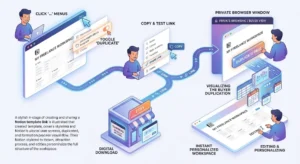
How to Create and Share a Notion Template Link
This step gets skipped in most guides, and it causes real problems for first-time sellers.
To share a Notion template, open the page you want to sell. Click the three-dot menu in the upper right corner. Select “Share,” then toggle on the option that says “Allow duplicate as template.” This is different from standard sharing. It gives buyers the specific ability to copy the page into their own workspace rather than simply viewing yours.
Once that toggle is on, copy the link from the same share menu. That link goes into your Gumroad product delivery, your Etsy digital download file, or wherever your product delivery is configured.
Before publishing, open the link in a private browser window and go through the duplication process yourself as a buyer would. Confirm that the “Duplicate page” button appears. Confirm that the full template, including all sub-pages and linked databases, copies correctly. Sellers who skip this step sometimes share view-only links by mistake, and buyers receive access to something they cannot actually use.
Once a buyer clicks duplicate, Notion copies the entire template structure into their workspace. They can rename it, edit it, and personalize it however they want. No file download is involved, which makes the delivery instant.
Refund Policy for Digital Products
Notion templates are digital goods delivered instantly upon purchase. Because duplication happens at the moment of access, most sellers operate on a no-refund policy for all digital downloads.
This is standard practice across digital product platforms. Etsy allows sellers to set their own refund policies, and most template sellers state clearly in their listings that digital products are non-refundable due to their instant delivery nature. Gumroad similarly allows sellers to define their own policy for each product they sell.
What reduces refund requests far more than any policy statement is a clear listing. Strong preview images, an honest product description, a “Start Here” page inside the template, and a way for buyers to reach the seller with questions all reduce dissatisfaction before it becomes a dispute.
If a buyer contacts you with a genuine technical problem, such as a broken duplicate link or missing sub-pages, resolving it quickly protects your seller reputation far more than any written policy.
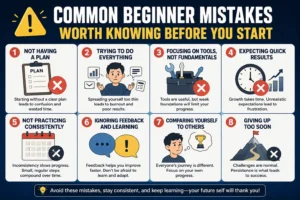
Common Beginner Mistakes Worth Knowing Before You Start
Most early stumbles in this space follow a recognizable pattern, and knowing them in advance makes a real difference.
Building too many linked databases into a single template is the most common structural mistake. The result looks impressive in a screenshot but overwhelms buyers when they open it. Systems that are easy to understand on the first visit get used. Complex ones get abandoned.
Skipping documentation is the second most common issue. A template without a “Start Here” page or usage instructions requires the seller to answer the same questions repeatedly. A few minutes of documentation prevents hours of support.
Using no preview images or only showing the cover page leaves buyers with nothing to evaluate. Listings with multiple screenshots showing actual database views and filled entries consistently outperform those with a single cover image.
Choosing an oversaturated niche without a specific angle means competing against heavily established listings without any real differentiation. General planners and generic productivity templates face the most competition and the least buyer loyalty.
Underpricing a complex system sends a mixed signal before the buyer has even read the description. Pricing that reflects the problem being solved tends to attract buyers who are ready to actually use the product.
What Realistic Growth Looks Like Over Time
Most sellers do not earn significant amounts in their first week. That is the honest starting point.
Depending on the niche, pricing, and marketing effort, a single well-optimized listing may generate anywhere from a modest amount to a few hundred dollars over its first several months. As the listing accumulates reviews and climbs in search ranking, those numbers tend to increase without proportional additional effort. Sellers with a catalog of six to ten templates across a focused niche, combined with some organic content driving search traffic, often report monthly earnings in the range of several hundred dollars.
The income is not hourly. Once the product exists and the listing is properly set up, sales happen without active effort on any given day. That is the real appeal — not immediate high earnings, but a system that earns without requiring time each time.
Sellers who build lasting income treat this as a product business rather than a one-time launch. They update listings when Notion releases new features. They respond to buyer questions. They improve a template based on feedback and note the update in the listing description. That small, consistent attention spread across a catalog builds something that compounds over months rather than days.
If you are exploring other ways to earn through digital products alongside Notion templates, this guide on how to sell digital products without investment covers several additional approaches worth looking at.

Frequently Asked Questions
Q1. Do I need to know how to code to sell Notion templates?
No coding knowledge is required at any stage. Notion is a no-code tool and all template building happens through its standard interface. If you can build a working Notion system for your own use, you already have everything needed to create a sellable product.
Q2. What is the best platform to sell Notion templates as a complete beginner?
Gumroad is the fastest to set up and the easiest to learn. Etsy has stronger built-in search traffic but involves more competition and setup time. Starting on Gumroad to test the concept, then adding an Etsy listing once the product is polished, is a sequence that works well for most first-time sellers.
Q3. How do buyers receive the template after purchasing?
Sellers include the shareable Notion duplicate link inside their product delivery on Gumroad, Etsy, or whichever platform they use. After completing the purchase, the buyer opens that link, clicks to duplicate the page into their own Notion workspace, and the entire template appears in their account instantly. No file download or installation is involved.
Q4. Can someone steal and resell a Notion template after purchasing it?
Once a buyer duplicates a template into their workspace, there is no platform-level control over what they do with it afterward. This is a known limitation of how Notion sharing works. Adding a usage notice on the first page and watermarking preview images provide practical deterrents. The majority of buyers have no interest in redistribution. Platforms like Etsy and Gumroad also have reporting processes for sellers who identify unauthorized resellers.
Q5. How many templates are needed before income becomes consistent?
A single well-positioned listing in the right niche can generate income on its own. That said, a catalog of five to ten related templates in a consistent niche tends to produce more stable results over time. Each additional listing increases search visibility, and buyers who purchase one template from a seller in a niche will often return for another from the same creator.
Final Thoughts
Do not wait until the template feels perfect. Publish something that genuinely works, collect feedback from real buyers, and improve from there. That cycle of releasing and refining produces better products faster than months of private iteration.
The Notion community is made up of people genuinely looking for systems that make their work or life more manageable. If a template solves a specific problem clearly, and the listing explains that problem in plain language to the right person, the right buyer tends to find it.
Start with one template. Price it to reflect the problem it solves. Write a description that speaks directly to the person who needs it most. That is the entire foundation. Everything else grows from there.
If selling templates alongside other digital products interests you, you might also find value in reading about how to sell Canva templates online. The niche is different but the platform logic, pricing principles, and marketing channels overlap significantly.
 Abdullah Waheed