
How To Sell Canva Templates Online: A Complete Guide
A friend who runs a small bakery once asked me to design an Instagram story layout in Canva. It took under an hour. She liked it enough to pay for it and ask for more.
That’s really the whole appeal of a Canva template business in one sentence. People aren’t paying for a masterpiece. They’re paying, so they don’t have to spend their own evening fighting with fonts and spacing.
This guide goes further than that one moment. It covers picking a niche, designing something worth buying, turning it into a shareable template link, pricing it sensibly, choosing where to list it, and getting it delivered without you lifting a finger after the sale.
If you’re exploring different ways to earn online through digital products, you may also want to read our guide on “How to sell digital products in 2026–2027 without investment.”
Why Canva Digital Products Sell So Well
Here’s something worth knowing before you design anything: most buyers aren’t designers. They’re small business owners, coaches, students, or someone planning a wedding with three weeks left on the clock. What they want is a layout they can open and personalize in ten minutes, not a blank page.
Simple, easy-to-edit designs usually outsell heavily decorated ones, and the reason isn’t really about looks. A planner with clean boxes and minimal decoration is faster to recolor and rearrange than one buried under icons and layered graphics. That’s part of why plain, almost boring designs often end up as the best-selling templates in a shop. Buyers aren’t just buying an image. They’re buying back their own time.
Choosing A Niche Before You Design Anything
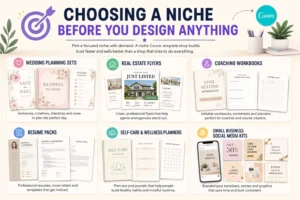
Selling a wedding invite, a gym tracker, and a random resume layout in the same shop rarely works as well as picking one lane and sticking to it. Buyers trust a focused Canva template shop more than a shop selling a little of everything.
So how do you actually figure out what to focus on? Start by searching directly inside the platform you plan to use. Type a broad phrase into Etsy’s search bar and watch what autocomplete suggests. Do the same on Pinterest. Canva’s own template search will also show you which categories are already crowded and which aren’t.
A few niches that have held up well over time:
- Wedding planning sets
- Real estate flyers
- Coaching workbooks
- Resume packs
- Self-care and wellness planners
- Small business social media kits
How To Create And Deliver A Canva Template
This is the part most guides skip, even though it’s the actual mechanics behind every sale you’ll make.
Step 1: Choose a niche. Pick one category based on what you found through the search, not just what you feel like designing.
Step 2: Create the design in Canva. Stick to fonts and elements from the free library wherever you can, so buyers without a paid plan aren’t locked out of editing anything. Keep spacing consistent. Don’t lock elements that a buyer might reasonably want to move.
Step 3: Convert it into a template link. Open the design, click Share, and switch on the “Template link” option instead of sharing a normal edit link. Each buyer then gets their own copy to work on, rather than accidentally editing your master file.
Step 4: Create preview images. Canva’s mockup frames work fine for this, and so does a tool like Placeit if you want something showing the design on a laptop or phone screen. Most marketplaces favor a square main image, often around 2000 by 2000 pixels, with two or three extra shots showing other pages or color options.
Step 5: Upload the listing. Write a title a real buyer would actually type into a search, not something vague. If you’re trying to sell Canva templates on Etsy specifically, your tags matter almost as much as the design itself.
Step 6: Set up automatic delivery. Most platforms support instant digital downloads. Add a short PDF with the template link and basic instructions, and the platform hands it over automatically the moment someone pays. No manual work needed on your end.
How Many Templates Should You Launch With?
A lot of new sellers publish one template, then sit back and wait. It rarely works that way.
A better approach is launching with a small, related collection rather than a single product. A shop with ten or twenty listings simply has more chances to show up in search results than one with two or three. Think of each listing as another door someone could walk through to find your shop, not as a separate project competing for attention.
You don’t need twenty finished designs before your first sale, but aiming for that range within your first month or two gives the shop a real shot at being discovered.
Where To Sell: Comparing The Main Platforms
Etsy Built-in search traffic makes it the easiest place to start a Canva template business. The tradeoffs are listing fees and a crowded marketplace.
Creative Market Buyers here tend to pay a bit more for polish. New sellers sometimes wait a few weeks for approval.
Your own website full control, bigger cut of each sale, but you’re responsible for bringing your own traffic instead of leaning on a marketplace’s built-in visitors.
Canva Creator Program. Where it’s available, this puts your work directly inside Canva’s own search, in front of people already mid-design rather than browsing a separate store.
Plenty of sellers run two platforms side by side, mainly so one algorithm change somewhere doesn’t wipe out their entire income overnight.
A quick way to size these up at a glance:
For sellers planning to build their own storefront instead of relying entirely on marketplaces, understanding the differences between Shopify and WooCommerce can help you choose the right platform.”
| Platform | Best For |
|---|---|
| Etsy | Beginners |
| Creative Market | Higher-priced products |
| Own Website | Long-term brand building |
| Canva Creator | Canva ecosystem exposure |
Pricing Strategy For Canva Templates
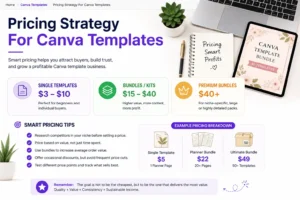
Single templates typically sell somewhere between three and ten dollars. Bundles or full kits often land between fifteen and forty, depending on how much is packed in. Pricing too low at the start is a common trap, since it ends up undervaluing both the design work and the time spent answering buyer messages.
Discounts can give sales a short-term lift, but lean on them too often and buyers start waiting for the next one instead of paying full price. Use them sparingly, not as the default strategy.
Promoting A Canva Template Shop Without Paid Ads
Pinterest tends to send more long-term traffic to digital products than other platforms, mostly because a pin keeps surfacing in search long after you’ve forgotten you posted it.
Search traffic can be just as valuable over the long term, which is why learning the basics of SEO is often worth the effort for anyone “Selling digital products online.”
A few specifics worth getting right:
- Keyword research: Type a relevant phrase into Pinterest’s search bar and note what autocomplete fills in, since that reflects real searches people are running. Pinterest Trends is also handy for spotting seasonal spikes, like wedding planners climbing in spring or daily planners climbing every January.
- Pin dimensions: A vertical 2:3 ratio, around 1000 by 1500 pixels, displays better in feeds than square or horizontal images.
- Pin titles: Specific beats vague. “Editable Canva Wedding Planner Template, Customizable Invitation Set” will outperform something generic like “Cute Planner” almost every time.
Beyond Pinterest, short clips showing a blank design being filled in with real content, plus a free starter template offered for an email signup, are two of the simplest ways to build an audience without spending on ads.
A First 30 Days Action Plan
If all of this still feels a little scattered, here’s roughly how it tends to break down week by week. Nobody has to follow it exactly, but it gives you a starting point instead of staring at a blank Canva tab wondering where to begin.
Week 1
- Pick one niche using the search methods covered earlier
- Sketch out and design around five related templates
Week 2
- Convert each design into a template link
- Write and publish the listings, with proper titles and tags
Week 3
- Set up a Pinterest profile if you don’t already have one
- Create a batch of pins for the new listings
Week 4
- Check what’s selling and what isn’t
- Adjust titles, prices, or tags on anything that’s getting views but no sales
By the end of the month, you won’t have a finished business, but you’ll have something real to keep building on, which beats endless planning every time.
Common Mistakes To Avoid
Naming a file “Pink Planner 1” instead of something searchable hurts visibility more than people expect, simply because it doesn’t match how anyone actually searches.
Skipping a basic instructions file inside a delivery is an easy way to end up with a confused buyer and an avoidable refund request, especially if they’ve never opened Canva before.
And spending hours decorating a design instead of checking how easy it is to actually edit is one of the more common traps. Buyers care more about usability than visual flair.
A Note On Licensing
Not every font, icon, or graphic inside Canva is automatically cleared for commercial resale. Check the platform’s content license page before publishing, and confirm any elements you’ve used are actually approved for resale. It’s a five-minute check that can save you from rebuilding a listing later.
Pros And Cons Of Selling Templates Online
Pros
- Low cost to start, often just time and a free account
- Can run alongside a full-time job
- Skills improve fast through repetition
- Works with nothing more than a laptop and free tools
Cons
- Income usually builds slowly in the early months
- The market keeps getting more crowded
- Ongoing promotion is required; it won’t sell itself
- Customer questions and the occasional refund take real time
Frequently Asked Questions
Q1. Do I need professional design skills to sell Canva templates?
Not really, and that surprises most people. Some of the simplest, almost plain layouts outsell the more artistic ones, mainly because buyers want something they can edit fast.
Q2. How much can a beginner realistically earn in the first month?
Honestly, it swings a lot. Some beginners earn little or nothing in the first month, while others land a handful of sales almost right away. It mostly comes down to niche selection, how clear the listings are, and whether any promotion is happening at all.
Q3. Should I start with Etsy or my own website?
Etsy, if you’re starting from zero. The built-in search traffic does a lot of heavy lifting for you. A personal website only really pays off once you’ve already got an audience pointed at it.
Q4. Is a free Canva account enough to create templates for selling?
It is. Just be careful with elements that need Canva Pro. Use them, and you’ll quietly lock out anyone buying who doesn’t have a paid plan.
Q5. How do I know if a design is too cluttered?
Try this test: hand it to someone who’s never opened Canva and watch how long they take to figure it out. If they stall, it’s too busy. Trim it down.
Q6. What matters most for long-term success in this business?
Showing up regularly, honestly, more than talent. Sellers who list consistently and bother to research a few keywords tend to outlast the ones chasing one perfect, polished template.
Final Thoughts
Selling Canva templates online rarely makes anyone rich overnight, and treating it that way is the fastest path to giving up too early. It works better as a slow, steady side business built on research, decent listings, and showing up consistently rather than one big launch.
Start with something simple and useful, list it properly, and refine the process as you go. That tends to beat waiting around for the perfect first product.
Many creators eventually combine template sales with blogging, freelance services, or other online income streams to build a more stable business.”
Link:
https://topicperson.com/make-money-by-freelancing/
 Topic Person