

How to Start an AI Agency: Complete Beginner Guide (2026 to 2027)
There was a moment early on that almost talked me out of this entire idea. Every video made it sound like the window had already closed thousands of people ahead of you, the market already flooded. Then one evening, sitting in on a video call with a small business owner, she turned to her marketing person and asked, half joking: “Can someone just make the AI answer my messages for me?” Nobody said a word. That silence was more useful than any video I’d watched.
This guide is what I wish someone had handed me back then. It covers what running an AI automation agency actually involves, why the timing still makes sense, what clients might pay and what you might charge, and how to build it without pretending to have skills you don’t yet have.
This guide is what I wish someone had handed me back then. “How to Start Freelancing and Earn Money: A Beginner’s Honest Guide”
What This Kind of Business Actually Involves
People often ask whether this means building chatbots from scratch or training your own AI models. It doesn’t not at the beginner level, anyway.
Think of it as setting up systems that quietly run in the background. A tutoring center I spoke with was losing students simply because inquiries sat unanswered for eight to twelve hours. By the time a parent heard back, they’d already messaged two or three other places. Setting up a system that replied instantly and booked a trial class the same evening changed things fast.
Response time research backs this up consistently the faster a business replies to an inquiry, the higher the chance it converts to a sale. That’s why something as unglamorous as an auto-reply can be genuinely valuable to a business owner, even when it sounds trivial from the outside.
The owner never needed to understand how any of it worked. She just needed it to work. That’s the actual job, more often than people expect: turning a messy daily problem into something that runs on its own.
Why the Timing Still Makes Sense
A couple of years ago, most of these tools required some technical confidence just to get through the setup dashboard, let alone configure anything useful.
That barrier has come down a lot. Awareness of AI is everywhere in the news, among competitors, and in family dinner conversations. But actual day-to-day usage among small businesses tells a different story. Thryv’s 2025 survey found that while 55% of small businesses reported using AI in some form, that figure includes one-time experiments. US Census Bureau data puts consistent operational use closer to 17–20%. The gap between “tried it once” and “built it into daily operations” is still enormous.
That gap won’t stay this wide for long. Bigger software companies will eventually fold a lot of this into products that businesses can configure themselves. Right now, though, many smaller business owners want to sit across from a person who can explain things plainly, not read a setup guide alone at midnight. That’s the opening.
Choosing Who You’ll Actually Help
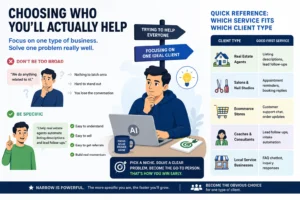
Early on, saying you can help with “anything related to AI” gives the other person nothing to latch onto. It usually costs you the conversation.
A furniture store owner asking for AI-written Facebook ads sounds easy enough until the first draft comes out reading like a tech startup pitch instead of a family furniture shop. The tool only works as well as the direction you give it, and some industries need a lot of direction. On the flip side, a freelance photographer asking to automate photo editing might be something you could eventually figure out, but if it’s outside what you can support reliably, saying no is the right call even when it stings.
Picking one type of business and one problem to start gives you something specific to say, something to practice, and something to point to. Target local real estate agents and focus on automating listing descriptions or lead follow-ups. That’s a narrow lane, but narrow lanes are where early momentum actually comes from.
Quick reference: which service fits which client type
| Client Type | Good First Service |
|---|---|
| Real Estate Agents | Listing descriptions, lead follow-ups |
| Salons & Nail Studios | Appointment reminders, booking replies |
| Ecommerce Stores | Customer support chat, order updates |
| Coaches & Consultants | Lead follow-ups, intake automation |
| Local Service Businesses | FAQ chatbot, inquiry responses |
Learning the Tools Before Talking About Them
Every automation tool markets itself as the simplest one. In practice, they all behave a little differently once you’re connected to a real account and something goes wrong.
Here’s how the main categories break down, with a few tools worth knowing in each.
| Tool Type | Example Tools | Best For | Learning Curve | Typical Cost |
|---|---|---|---|---|
| AI Chat Assistants | ChatGPT, Claude | Writing replies, content, and research | Easy | $0 to $20 per month |
| Automation Platforms | Make, Zapier | Connecting apps and workflows | Medium | Low to medium |
| Chatbot Builders | Voiceflow, Botpress | Customer service and bookings | Medium | Medium |
| Voice AI Tools | Vapi, Retell AI | Phone call handling | Medium to high | Medium to high |
Automation platforms like Make and Zapier can link a wide range of apps without any code, which makes them useful for reminders, follow-ups, and anything repetitive. The catch is that they can break quietly when one of those apps updates its interface, and they’re sometimes slower than something built specifically for one task.
This is what people mean when they say AI workflow automation: taking output from one tool and feeding it into another, so a person doesn’t have to copy and paste it manually every day.
One thing worth learning early: always test on a tiny sample before pointing a workflow at real customer data. Running a welcome message sequence against an entire mailing list instead of just new entries is an easy, embarrassing mistake and hard to walk back once it’s started.
A Simple Starting Toolkit
Staring at a long list of tools is a fast way to do nothing. A small handful covers almost everything a beginner project actually needs.
ChatGPT or Claude handles drafting replies, writing content, and thinking through how a workflow should sound before you build it. Make and Zapier are the two platforms most people start with, since both connect popular apps, email, spreadsheets, and messaging tools without writing code. Tidio works well for adding a basic chat widget to a small business website, and Voiceflow is worth looking at once you’re ready for something closer to a full conversational chatbot.
Which one first? Honestly, it barely matters. Spending the first couple of months with just ChatGPT and making nothing else is enough to deliver real work to a paying client. Most of these tools have free tiers that cover testing and your first unpaid project with room to spare.
Creating Proof Before Anyone Pays You
Without any finished work to show, every new conversation starts from zero trust. That’s a slow way to build. You can learn how to build a website with Claude AI for free
One approach that tends to work: find a business you already have a connection to a friend’s shop, a service you use regularly, and offer to build something for free. An automatic reply system for common Instagram questions, for instance, usually takes about a week. Before it’s set up, replies during busy periods might take three or four hours. Afterward, most questions get an answer within minutes, around the clock.
The owner doesn’t pay anything. But a few weeks later, she mentions it to someone else. That conversation becomes a second client with no pitch from you at all.
One real example, with a clear before and after, changes how people respond. It stops sounding like a sales pitch and starts sounding like something that already works.
Setting Up the Boring but Necessary Parts
This doesn’t need to be complicated, but leaving it undone catches up with you.
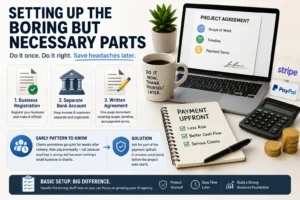
A basic business registration, a separate bank account for income and expenses, and a short written agreement for each project cover most of what a beginner actually needs. A one-page document in Google Docs covering scope, timeline, and payment terms is enough for most early work. For payments, Stripe or PayPal handles things cleanly, including international clients, without much setup.
One pattern worth knowing about early on: clients sometimes go quiet for weeks after a project is delivered, then pay eventually not because anything is wrong, but because running a small business is chaotic. Asking for part of the payment upfront removes that uncertainty before the project starts.
Talking About Money Without Underselling Yourself
There are three main ways people price this kind of work: a flat fee for a one-time setup, a monthly retainer for ongoing tweaks and support, or results-based pricing which sounds appealing but is genuinely hard to measure fairly in most situations.
Here’s roughly where beginners tend to start, based on what’s realistic in the early months:
| Service | Beginner Price Range |
|---|---|
| AI Chatbot Setup | $200 to $500 |
| Lead Automation | $300 to $1,000 |
| Monthly Support | $100 to $500 |
These ranges shift based on location, complexity, and how much ongoing involvement is included. Treat them as a starting point, not a ceiling.
When a client pushes back on price, the conversation usually shifts when you walk them through what the task currently costs in staff hours. A yoga studio owner who thinks a chatbot quote is steep for “just a chatbot” often sees it differently after calculating how much time her front desk spends answering the same five questions every day. You might still negotiate but now you’re negotiating around value, not just the number.
Most beginners undercharge early on, and it’s almost never about skill. It’s nerves. That underpricing isn’t wasted, it buys you the case studies and confidence to charge properly on the next one.
Where Early Clients Actually Come From
Most people assume they need ads or a big audience to find clients. The first few almost always come from somewhere much quieter.
Walking into a local business just to talk is underrated. An owner who laughs and says, “AI sounds expensive, I just have a phone,” isn’t a dead end. That response tells you exactly how to explain what you do more plainly, which helps in every future conversation.
Referrals tend to snowball once they start. A hairdresser who mentions your work to her sister, who runs a nail salon nearby, becomes a new client without any direct effort from you.
Short video clips showing something you’ve actually built a chatbot answering questions, a workflow running automatically, also attract attention from business owners who can immediately see themselves using it. That’s different from reading a description of what you offer.
Delivering Without Promising Too Much
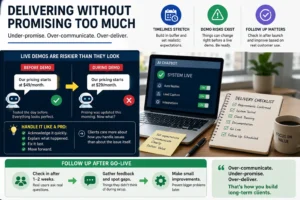
Timelines stretch more often than they compress, so build in a buffer.
Live demos are riskier than they look. A chatbot that answered test questions perfectly the day before might pull outdated pricing on the call because the client updated their price list that morning without saying anything. A few awkward seconds, a quick explanation, a fix within the hour. Most clients come away more reassured than annoyed, since they’ve just seen how fast things can be corrected.
Following up a week or two after something goes live is also worth building into every project. Real customers ask things that nobody anticipated during setup, and small adjustments at that stage prevent bigger issues later.
Common Mistakes and Challenges
A few patterns come up again and again among people just starting out.
Saying yes to work outside your actual strengths, just to avoid losing the lead. Running five tools when two would do the same job. Charging too little and eventually resenting the projects that result from it. Dropping a working toolset every few weeks to chase whatever’s trending. None of these are fatal, but they slow things down in ways that aren’t obvious until months later.
Staying with one core toolset for a few months, even an imperfect one, builds more real speed than constantly switching.
Further along, a different set of problems shows up. Client expectations can shift once a system is live, especially because the word “AI” tends to imply unlimited capability to people who haven’t worked with it. Tool costs can creep up as usage grows, particularly with platforms that charge per task. Workflows that ran perfectly during testing sometimes fail quietly after launch usually because something changed on the client’s side that nobody mentioned. And handling customer data (names, phone numbers, messages) means being straightforward with clients about what the tools store and where.
Growing Past Working Alone
At some point, the hours available stop matching the work coming in.
Bringing someone in part-time for the technical setup side, while focusing your own time on client conversations and project management, is a natural move. The training takes longer than expected, mostly because much of what you know lives in your head rather than being written down. That’s worth fixing before you actually need to hand things off.
Relationships with web designers and small marketing agencies can become a steady, low-effort source of work. An agency that sends automation work your way when clients ask, and gets design referrals back in return, is the kind of thing that builds slowly but keeps going on its own.
Final Thoughts
That silence on the call, nobody having an answer to a basic request, stuck around longer than the call itself. It wasn’t a dramatic insight. It just made the gap visible in a way that articles and videos hadn’t.
The businesses that get the most out of this kind of automation aren’t the big ones. They’re the small businesses burning hours every week on things that repeat themselves the same questions answered again and again, the same listings written from scratch, the same follow-ups chased manually. Solving one of those problems for one type of business builds real experience, real case studies, and repeat work much faster than trying to help everyone with everything.
Frequently Asked Questions (FAQs)
Q1. Do I need a technical background to do this?
Not really. Most beginner-level tools use visual, drag-and-drop setups rather than code. That said, being comfortable troubleshooting small issues on your own does matter over time, when things break, and clients expect you to fix them.
Q2. How long until the first client?
For some people, a few weeks. For others, several months because they’re still building confidence or waiting until they have something to show. The timeline tracks closer to outreach and proof of work than to technical ability.
Q3. What if the first project doesn’t go perfectly?
It probably won’t, and that’s fine. Small issues during testing or early use are normal. How you handle them tends to matter more to a client than whether everything ran flawlessly from day one.
Q4. How do I know if a business needs this kind of help?
Listen for repetitive tasks they mention doing manually answering the same questions, writing similar content, chasing the same follow-ups. Those are the clearest signals.
Q5. How much can an AI agency realistically earn?
Early on, most people bring in a few hundred to a couple thousand dollars per project, usually while keeping a day job. Once three to five retainer clients are in place, monthly revenue often lands between $3,000 and $8,000 more if the services are higher-touch. The ceiling tends to rise naturally as case studies build and referrals start moving on their own.
Q6. Can this work alongside a full-time job?
Yes, and it’s how most people start. Evenings and weekends are enough to take on one or two early projects while keeping income stable. The transition to full-time usually happens gradually, when client work starts competing seriously with the day job for time.
 Abdullah Waheed