
SEO Guide for Beginners: How to Rank Your Website on Google in 2026-2027
Honestly? The first time I heard “SEO,” I closed the tab.
Sounded technical. Sounded expensive. Sounded like something you hire an agency for. I kept writing blog posts the way I always had, just hitting publish and hoping someone would stumble across them.
Nobody did.
Months passed. Then I wrote one post, kind of rushed it, used a weirdly specific phrase in the headline without even thinking about it, and two weeks later, that post was pulling in 60 visitors a day on its own. It was a basic article about finding your first freelance client, nothing fancy, just a specific phrase nobody else had written about directly. I hadn’t shared it anywhere. No ads. Nothing.
That’s when I actually sat down and tried to understand what happened.
SEO, search engine optimization, is basically the art of helping Google figure out that your page exists and that it’s worth showing to people. That’s it. No dark magic. No secret formula. Just making your content easy for the system to read, understand, and trust.
What’s Inside
- Why Organic Traffic Hits Different
- What Google Is Actually Trying to Do
- How Google Crawling Actually Works
- Indexing: From Crawled to Actually Showing Up
- What Actually Matters in SEO in 2026
- Keyword Research Before You Type a Single Word
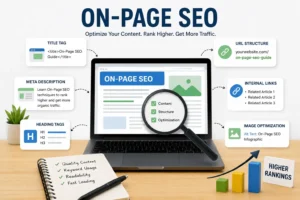
- On-Page SEO: What You Can Actually Control
- Content Quality, The Bit Nobody Wants to Hear
- Speed, Mobile, and Technical SEO
- The Waiting Part Nobody Warns You About
- Frequently Asked Questions
Why Organic Traffic Hits Different
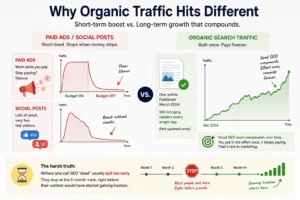
Look, I’ve run paid ads. They work, sure. Until the budget runs out. Then: silence.
Social media posts? I’ve had posts get 400 likes and generate maybe 12 actual website visits. Reach without results.
Organic search traffic is different. An article I published in March 2024 about a specific blogging tool that beginners keep getting confused by still brings in readers every single day. I haven’t updated it once. What I found, slowly, was that good SEO work compounds. You put the effort in once, and it keeps paying. That’s rare in marketing.
One thing that became obvious pretty fast: the writers who get frustrated and call SEO “dead” are usually the ones who quit at the two-month mark, right before their content would have started gaining traction.
Organic traffic works especially well for bloggers because one good article can keep bringing visitors for months. If you’re planning to start your own site, you can read my guide on “How to Blog and Earn from AdSense.”
What Google Is Actually Trying to Do
Here’s a mental shift that changed everything for me.
Google is not your enemy. It’s not trying to hide your content. Its whole business model depends on surfacing the most genuinely useful result for every search. If your page does that better than anyone else’s, Google wants to show it. Badly.
The algorithm is really just Google asking one question over and over: Does this page actually help the person who searched for it? Backlinks, page speed, time on page, all of it is just Google trying to measure that same thing from different angles.
So when I stopped thinking “how do I trick Google” and started thinking “how do I actually serve the person searching for this,” results started moving.
How Google Crawling Actually Works (And Why It Matters)
Most people learning SEO jump straight to keywords and skip this entirely. That’s a mistake I made too.
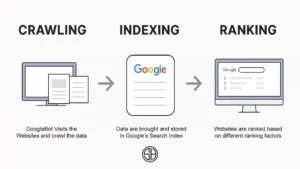
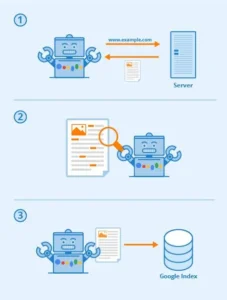
Before Google can rank your page, it has to find it. That happens through a process called crawling. Google runs automated bots, called Googlebot or spiders, that travel across the web constantly, following links from page to page, reading content, and taking notes. Not glamorous work. Just endless reading and note-taking.
Here’s something most guides skip. There isn’t just one Googlebot. There are several, and they each do different things:
Googlebot Desktop simulates a regular desktop browser visit. It reads your page the way a laptop user would.
Googlebot Smartphone is the one that matters most right now. Since Google switched to mobile-first indexing, this bot is the primary one evaluating your content. If your site looks broken on mobile, this crawler sees that, and your rankings feel it.
Googlebot Image focuses specifically on images across your pages. Alt text, file names, and surrounding context, all of it gets read here.
Googlebot Video does the same for embedded videos. Titles, descriptions, schema markup, they all help this crawler understand what your video content is about.
AdsBot is separate from ranking. It evaluates your pages for ad quality. Doesn’t affect SEO directly, but worth knowing it exists.
Now, crawling and indexing are two different things. Crawling means Google visited your page. Indexing means Google decided it was worth storing and potentially showing in results. A page can get crawled but not indexed if Google finds it thin, duplicate, or confusing.
I discovered this the hard way. I had 40 published posts on my blogging and SEO site, and only 22 were indexed. The rest had been crawled, noted, and basically ignored. When I looked at the ones being skipped, they were short, lacked original information, and mostly restated what bigger sites had already covered better.
So how does the crawler actually find your pages? It follows links. That’s really it. If a page on your site has zero other pages pointing to it, Googlebot might never land there. I had a whole category of posts covering beginner blogging mistakes sitting unlinked for four months, and none of them got indexed. Linked to them from a few main articles, and three showed up in Search Console within a week.
XML sitemap is worth submitting to. It’s just a list of all your URLs with timestamps, handed to Google through Search Console. Not magic, but it removes guesswork. And robots.txt, most beginners ignore it entirely, which is usually fine. Just don’t accidentally block Googlebot from crawling your whole site. It happens more than you’d think, especially after theme changes.
URL Inspection in Search Console is what I use after every publish. Paste the URL in, hit “request indexing,” and done. Google doesn’t have to comply, but it usually speeds things up. Still not indexed after two weeks? That’s a real signal, could be thin content, could be a redirect mess, could be something in your robots.txt file. The tool actually tells you what it found when it crawled. Worth checking before you assume the worst.
Indexing: From Crawled to Actually Showing Up
So crawling happened. Great. Now what?
After the crawler visits, all that data goes back to Google’s servers and gets processed. The pages Google thinks are worth keeping go into the index. That’s the actual database it searches through when someone types a query. Your page needs to be in there. If it’s not, it simply doesn’t exist as far as search is concerned.
But here’s the part beginners don’t realize: getting indexed is not automatic. Google makes a judgment call on every single page. And it says no a lot.
I’ve watched pages sit in a permanently crawled-but-not-indexed state for months. Google kept revisiting them, clearly wasn’t impressed enough to commit, and moved on. When I dug into why, the pattern was consistent, content too thin, too similar to bigger pages already indexed, or structured so messily that Google couldn’t figure out what the page was actually about.
What actually helps? Original content that Google hasn’t already seen a better version of. Internal links from other pages that it already trusts on your site. Fast mobile load time. Clean heading structure. And canonical tags, those specifically tripped me up for ages. If your article is accessible at two different URLs (with and without www, for example, or http vs https before you fixed SSL), Google might index neither because it can’t decide which one is “official.” A canonical tag is just a line of code that says: this URL, right here, is the real one. Index this one.
What Actually Matters in SEO in 2026
Before getting into the mechanics, here’s the part that most beginner guides published two years ago completely miss.
Search has changed. Not dramatically overnight, but enough that what worked in 2022 gets different results today.
Google now shows AI Overviews at the top of many search results. These are AI-generated summaries pulled from multiple sources. For informational queries, especially, a chunk of users now read the overview and never click anything. What this means practically: you need to be the source Google pulls from, not just a page that ranks below it. That happens by being genuinely authoritative, specific, and well-structured.
EEAT stands for Experience, Expertise, Authority, and Trustworthiness. Google added the first E, Experience, a couple of years back, specifically to reward content written by people who have actually done the thing. First-person accounts, real examples, and genuine mistakes you made and corrected. That’s experience. An about page with credentials, a clear author bio, and citations from reputable sources help with the other three.
Topical authority is something I wish I had understood earlier. It basically means Google trusts sites that cover a topic deeply and consistently more than sites that publish one article on twenty different topics. If your blog covers freelancing, publishing fifteen solid freelancing articles builds more trust than publishing one freelancing article alongside posts about cooking and travel. Clusters of related content reinforce each other.
Helpful Content system updates have been rolling out since 2022. Google keeps refining its ability to detect content written primarily to rank rather than to help. The sites that got hit hardest were the ones producing high volumes of surface-level content that technically answered questions but didn’t give readers anything they couldn’t have figured out in thirty seconds elsewhere. Writing with genuine depth, from real experience, with specific examples, is not just good advice anymore. It’s what the algorithm is specifically trying to surface.
AI-generated content itself isn’t banned. Google has said clearly that it evaluates content based on quality, not how it was produced. But AI content that’s unedited, generic, and adds nothing new tends to fail the helpful content test pretty fast.
Keyword Research Before You Type a Single Word
I used to write whatever I felt like writing, then afterwards think about whether it might rank for anything.
That’s backwards. Like building a shop and then checking whether anyone wants what you’re selling.
Keyword research means finding out what people are actually typing into search before you write. The difference it makes is enormous. My early posts targeted phrases like “freelancing tips”, searched millions of times per month, dominated by sites with decades of authority behind them. Zero chance for a new blog.
When I shifted to targeting things like “how to get freelance clients with no portfolio,” competition dropped massively. The audience was more specific, yes. But they were also more engaged and far more likely to stick around.
Tools I actually use:
Google Keyword Planner is free and pulls from real search data. Start here.
Ubersuggest shows keyword difficulty alongside volume. Useful for figuring out which battles are actually winnable.
The Google search bar itself is underrated. Type your topic and look at the autocomplete suggestions. Scroll to the bottom of the results page. The “related searches” section there is basically a free map of what your audience is actually asking.
Long-tail keywords, phrases with three or more words, are where newer sites should spend most of their energy. Lower competition. More targeted traffic. People searching for specific phrases know what they want, which means they’re more valuable visitors.
On-Page SEO: What You Can Actually Control
This is where I’d put most of my energy early on. Not because it’s glamorous, it’s not, but because it’s entirely yours. No waiting on backlinks from strangers. No building domain authority for two years. Just don’t waste the basics you already have.
Title tag. Keyword goes in here, yes. But more than that, the title has to make a real person want to click yours over the fifty other results sitting right next to it. “SEO Tips” tells me nothing. “SEO Tips That Got My Blog to 4,000 Monthly Visitors Starting From Zero” makes me curious. That gap is everything.
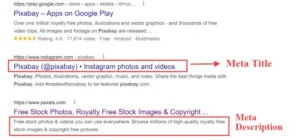
Meta descriptions, they don’t move rankings by themselves. What they do is change whether someone clicks. And honestly, click-through rate does eventually circle back to how Google reads your relevance. So write it like you’re trying to earn that click, not just fill a character limit.
H1, H2, H3 headings. One H1 per page, that’s the main title. Sections beneath it get H2s; anything nested under those gets H3. Less about the tags specifically, more about giving the page a shape that a reader scanning on mobile and a crawler reading top to bottom can both follow without getting confused.
URLs, I wasted years on sites where posts lived at addresses like /?p=2847. Unreadable. Swap it for a short, actual-English slug with the keyword in it. yoursite.com/seo-guide-beginners. That’s it.
Alt text. Not the filename. Not blank. A real description of what’s in the image. I think of it as writing a caption for someone who literally cannot see the screen; that framing makes it obvious what to write.
Internal links, finally. I skipped these forever, and it cost me. New post goes up, link it to two or three relevant older ones. Then go back to those older posts and link forward to the new one where it fits. Google reads those connections to figure out which pages on your site are actually important. It also just keeps people reading instead of bouncing.
| Element | What Hurts | What Helps |
|---|---|---|
| Title | “Blog Post #4” | Keyword + clear benefit |
| URL | /p=2948 | /your-main-keyword |
| Alt text | “img002” | Descriptive phrase with context |
| Internal links | Zero | At least 2 related pieces of content |
| Meta description | Blank | 150-character summary written for humans |
Content Quality, The Bit Nobody Wants to Hear
Okay, so here’s the uncomfortable truth I had to accept at some point.
You can nail every technical thing, fast site, clean URLs, perfect alt tags, sitemap submitted, and if the actual writing is hollow, none of it holds. I watched a perfectly optimized post drop from page one to page three in about six weeks because three newer articles on the same topic were just… better. More thorough. Answered follow-up questions; mine didn’t even touch.
Google’s gotten weirdly good at this. It can tell the difference between a page that genuinely helps someone and a page that looks like it helps someone. Thin content, fluff paragraphs, the same sentence dressed up four different ways, it all used to work. Doesn’t anymore, not really.
What actually changed my results was this: I stopped writing “for SEO” and started writing like I was explaining something to a friend who was specifically confused about it. My friend who runs a small Etsy shop and has zero technical background. When I picture her reading my stuff, I naturally cut the jargon, add more examples, and skip the padding.
One article on my blog targeting a low-competition keyword about how to write a freelance proposal went from ranking position 14 to position 4 within about five weeks after I expanded it with real examples and answered three follow-up questions the original version completely ignored. Same keyword. Same URL. I just made it actually useful.
The example thing is huge, by the way. Don’t just say “write a specific title.” Show the before: “Writing Tips.” Show the after: “Writing Tips That Helped Me Actually Finish My First Novel Working 30 Minutes a Day.” People copy the pattern, not the advice. Give them the pattern.
Strong SEO can get people to your page, but quality writing is what keeps them there. If you’re interested in turning that skill into income, check out my guide on “How to Earn Money by Content Writing.”
Speed, Mobile, and the Technical Stuff That Actually Affects Rankings
This section doesn’t need much explanation. Just a few things that actually affect where you show up.
Your site needs to load fast. Not “pretty fast.” Actually fast. Run it through Google PageSpeed Insights, it’s free, and fix whatever it flags. Slow sites lose visitors before the page even finishes loading, and Google tracks that.
Mobile is now the primary thing Google evaluates. Not desktop. Phone. If your layout breaks on a small screen, that’s what Googlebot Smartphone sees, and that’s what your rankings reflect. I tested my first blog on my actual phone and found three images that were completely broken on mobile. They looked fine on a laptop. Would never have caught that without checking.
HTTPS. The little padlock. If your URL still starts with http:// instead of https://, fix it today. Most hosts provide the SSL certificate for free. Sites flagged as “not secure” get less trust from visitors and less from Google.
Google Search Console is free and takes about 20 minutes to set up. Once it’s connected, you can see exactly which posts are indexed, which ones have errors, what search terms people are using to find your site, and which articles are sitting on page two. That last group is gold. A page already ranking on page two just needs a bit of improvement to hit page one.
The Waiting Part Nobody Warns You About
In month one, I published four posts and checked my analytics every single morning. Zero. Literally zero organic visits.
In month two, I published three more. Still nothing. I genuinely thought I was doing something fundamentally wrong.
Then, around week fourteen, one post started getting 8 visits a day. Then 20. Then it was just sitting at 40-50 daily, and I hadn’t touched it since the day it went live. I remember staring at the Search Console graph thinking, ” Oh. So THAT’S how this works.
Here’s the thing nobody tells you. “Nothing is happening” and “something is building” look completely identical when you’re in it. The crawling is happening. Pages are getting evaluated. Trust is quietly stacking up. But your analytics show nothing, so you assume it’s not working. Most people quit around month two or three. The people who keep going get all the traffic those quitters would have had.
What keeps me going now is this dumb little monthly habit: I pick two older posts, read them cold like a stranger would, and ask myself three questions. Is anything outdated? Is there one example I could make sharper? Does the intro earn the reader past the first paragraph? Usually, I change maybe 150 to 200 words total. Nothing dramatic. But those quietly-touched posts have a pattern of climbing 3 to 6 positions over the following month. Every single time.
Frequently Asked Questions
Q1. How long until SEO actually does something?
Honest answer: three to six months before you see consistent movement, and that assumes you’re publishing regularly. Some lower-competition niches move faster. Some take longer. The tricky part is that progress often happens before it shows up in your numbers, so quitting at month two is basically quitting right before the payoff.
Q2. Do I need paid keyword tools?
I’d say no, especially at the start. Spend the first three months with Google Keyword Planner, the Search Console performance report, and the autocomplete suggestions in Google search. That combination tells you more than most paid tools will; you just have to actually use them. Buy Ahrefs or Semrush later when you know what you’re looking for.
Q3. Wait, crawling and indexing aren’t the same thing?
Nope. Crawling means Googlebot visited your page and read it. Indexing means Google decided to keep it and potentially show it to people. You can get crawled without getting indexed, usually because the content’s too thin, too similar to something already indexed, or the page loads like garbage on mobile. URL Inspection in Search Console tells you which one happened to each of your pages.
Q4. One keyword per article, or can I target a bunch?
One main keyword, then a handful of related phrases that genuinely belong in the same article. The problem with targeting five unrelated terms in one post is that the article tries to serve five different searches and ends up serving none of them well. Google rewards depth. Trying to catch every keyword in one post usually means ranking for none of them.
Final Thoughts
SEO is not about finding shortcuts. It is about creating content people genuinely find useful and making it easy for search engines to understand.
Stay consistent, keep improving your content, and be patient. Most successful websites grow through steady effort, not overnight results.
 Abdullah Waheed