
Complete guide to starting a blog and earning from AdSense in 2026 – 2027
Step-by-Step Guide to Start a Blog
Blogging is the process of creating a website to publish valuable content for an online audience, such as information, ideas, and experiences.
This blog can be an informative content, from which you can also earn through ads/affiliate marketing, and you can create your brand website, where you can sell digital and physical products all around the world.
So in this article, you will explore how you can create and launch your first blog,
1. Choose a Profitable Niche
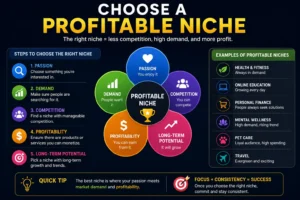
The most important step before creating a blog is to choose the right niche because the domain name is based on the niche selection.
So, first of all, explore different websites, check the searched data, which topic has more search volume, and in which niche other people are writing articles, such as technology, tips for daily routine, health, and fitness, etc.
Then choose the right niche in which you can write articles well, and then choose that niche and write articles on it.
2. Select a Domain Name and Hosting
What is a domain?
To address your website, you have to give it a name, and that name is called a domain. For example, the blog on which you are reading this article has a domain name “TopicPerson“. By searching topicperson.com/ in the browser, this blog site will open. Now it comes to choosing a domain, always try to choose a simple and easy-to-spell word domain. This also has a good effect on user experience.
How to buy a domain?
Buying a domain is not a difficult task, but remember to always buy a domain from a trusted domain registrar like Namecheap or GoDaddy.
First of all, think of a name related to your niche and then verify that the domain of that name is available. Once a domain is registered, no one else can register it. Once you select, then click on ‘add to cart or buy now’, choose the registration period (like 1 year or more), then clear the payment by giving the payment details, then after successful payment, the domain will be added to your account successfully. It is recommended to buy a domain with .com,
What is hosting?
Hosting is like a virtual storage in which all the content of your website is stored, such as all the articles, designs, products, and customer reviews & feedbacks written and published by you or users, etc. Hosting not only stores all this, but it also makes your website content accessible to the users on the internet, so that people can visit your website. Without hosting, no one can access your website on the internet.
3. Set Up Your Blog (WordPress Guide)
First Step!
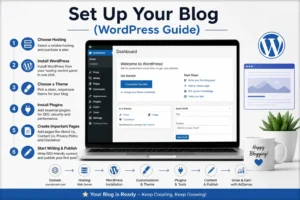
Setting up your blog is the main process; now either you can learn coding and web development and create a custom site yourself, if you do not want to go into technical things and want to create a blog in a short time then we have 2 best options, “WordPress and Blogger’, but today in this article we will learn to create a blog on WordPress, so first of all you have to log in to your hosting control panel and install WordPress if it is not built-in installed,
After WordPress is installed you have to click on create a new website then click on continue with WordPress site and enter your domain name and click ‘ok’ then your website will go live in just a few minutes, but make sure to add an SSL certificate, mostly it is included in the hosting package but if not then you will have to get it separately, this also increases the trust of users and AdSense.
Next Step,
Then the main important task is to choose and apply the best suitable theme for your blog, theme basically controls the look and overview of your website, on WordPress you will find thousands of themes of every type, both premium and free, you have to choose a clean and modern design and customization theme according to your blog in which readability is good and its interface is good for both mobile and desktop so that every thing comes into the user’s attention. You can install themes directly from the “Appearance > Themes” section.
Next Step,
The next step is to install the required plugins for your blog. Plugins are tools that add extra functionality to your website without coding knowledge. For example, you can add security plugins to protect your blog site from hackers, SEO plugins to improve and optimize your articles for search engines, and caching plugins to clear your site’s caches and improve your website speed. and much more. You will get almost all types of plugins, both paid and free.
Next Step,
Before publishing your content you have to add some important pages on your site like, About us, Contact Us, Privacy Policy and disclaimer, these pages are not just to show users, but if you want to run ads on your website and want to take approval from Google AdSense or any platform then it is also necessary for that, these pages also improve the overall quality of the website, make it professional and also build trust with AdSense, besides this it also has many benefits like if you are providing any services then the customer can first read the privacy policy and disclaimer so that no issue arises in the future and can contact you directly through the contact us page.
4. How to Write SEO-Friendly Content

Writing SEO-friendly content isn’t just about pleasing Google; it’s really about helping the people who are reading your articles. If your content is easy to read and useful, search engines will automatically like it.
1. Keyword Research and Its Proper Use
First, see what people are actually searching for. Once you’ve found the right keywords, incorporate them naturally into the title, headings, and other elements, rather than forcing them in. Your title should be clear enough to immediately explain what’s inside, and the intro should be captivating enough to compel the reader to continue.
2. Make the Content Easy to Read
No one wants to read a long, complicated paragraph. So:
Headings (H1, H2, H3): Use headings to let the reader know when the topic is changing.
Short Paragraphs: Keep the point concise.
Quality over Quantity: Don’t waste words just for the sake of writing long stories; instead, talk about useful things that save time for the important ones.
3. The Nuances of On-Page SEO
It’s important to take care of technical matters as well. Make sure to include your main keyword in the Meta Title, Meta Description, and URL.
Links: Link to your previous articles (Internal Linking) and also cite a trusted website (External Linking).
Images: Don’t forget to write ‘Alt Text’ behind images.
Speed: Remember, if your website runs slowly on mobile, readers will immediately leave.
4. User Intent and Originality
The biggest mistake is copying someone else’s content. Google loves “originality.” Before writing, think about what the reader is looking for. Are you providing a step-by-step guide or solving a problem? When your goal is to help readers, both getting Google AdSense approval and achieving ranking become easier.

5. Keyword Research
Keyword research is essentially the first step that helps you understand what people are searching for. Instead of choosing a topic at random, you look at what people are actually typing and searching for on Google. The best keyword is one that people are searching for, but without so much competition that it becomes difficult to rank.
1. Choose the Right Keywords
Instead of chasing broad and difficult keywords, it’s better to focus on “long-tail keywords initially.” For example, instead of just “AI Tools,” focus on “Best Free AI Tools for Students.” The advantage of this is that it’s easier to rank for them, and secondly, you know exactly what the person searching for them is looking for. You can easily check what’s trending in the market using tools like Google Keyword Planner or Ubersuggest.
2. Use Keywords in the Right Place
Once you’ve chosen keywords, the next step is to use them properly within your content, but remember, don’t force them (keyword stuffing). Use them naturally:
Place them in your title and intro.
Include them in headings.
Use similar keywords (LSI keywords) throughout the article so Google understands your content clearly.
3. Understand Competitors and User Intent
A little research is essential before writing. See what the people who are already ranking have written. Then try to make your content better, more detailed, and simpler than theirs. The most important thing is “user intent.” If someone is looking for a “guide,” walk them through it step-by-step; avoid repeating the same information again and again.
6. How to get AdSense Approval
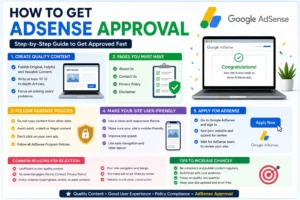
Getting the green light from Google AdSense isn’t just about filling out an application—it’s about making your site feel like a real, helpful place for readers. First off, stop worrying about “filling space” and start focusing on value. Your content needs to be original and genuinely useful. I’d recommend having at least 10–15 solid articles ready to go. They shouldn’t be surface-level; they need to actually cover the topic in detail. Also, keep your site’s look clean. If it’s hard to navigate or looks messy on a phone, Google will probably pass on it. Don’t forget the basics: a fast-loading site with an SSL certificate (that little https lock) is a must for building trust.
AdSense Requirements That Really Matter
To pass the review, you’ve got to stick to the ground rules. Your content has to be 100% yours—no copy-pasting or “spinning” other people’s work. Stay away from anything controversial or policy-breaking, like copyrighted material. When you’re writing, keep the language simple. You’re trying to help people, not impress them with big, robotic words. Using proper headings and short paragraphs makes a huge difference in how readable your site feels. Another tip: stay consistent. A site that looks like it’s been abandoned for weeks is an instant rejection. Even if your domain is new, showing active, regular posting helps you look legit.
Common Pitfalls to Watch Out For
Most people get rejected because they rush the process. The biggest mistake? “Thin content.” This is when you write a bunch of super short, low-quality posts just to get the numbers up. Google sees right through that. Another big no-no is keyword stuffing; if it feels weird to read, it’s probably going to be flagged as spam. Also, check for broken links or a cluttered layout with too many empty widgets. My advice? Don’t hit that apply button until every corner of your site feels finished and professional. It’s better to wait a week and get it right than to get rejected and wait a month to try again.
The “Big Three” Pages You Can’t Skip
There are a few pages you absolutely need to have before you apply: About, Contact, and Privacy Policy. These aren’t just filler—they prove you’re a real person or business. The About page tells your story and builds authority. The Contact page shows you’re reachable and transparent. And the Privacy Policy (plus a Disclaimer) tells users how their data is handled. Having these set up correctly shows Google that you’re running a professional operation, which massively swings the odds in your favor for approval.
Additional Tips for Long-Term Blogging Success
Building a blog that actually grows takes time, and most people underestimate that part.
A lot of beginners publish ten or fifteen articles and then wonder why nothing is happening. The writing is only one piece of it. What you do after publishing matters just as much.
Go back to your old posts every couple of months. Information gets outdated faster than you think, and a reader who finds wrong or stale information will leave and never come back. Keeping your content accurate is one of those small habits that pays off quietly over time.
Google Search Console is something you should be checking regularly. It tells you what is getting indexed, what is not, and which pages are actually showing up in search. Most beginners set it up and forget about it, which is a waste of a genuinely useful free tool.
Link your articles to each other where it makes sense. Not forcefully, just where it actually helps the reader go deeper on something. This keeps people on your site longer and helps Google understand what your blog is really about.
Page speed and mobile experience are things you want to sort out early. Most readers are on their phones, and a slow-loading site loses them in the first few seconds. This is not something to fix later.
And the thing that probably matters most is letting go of the idea that more content equals more success. A smaller number of articles that genuinely answer something or help someone will always do better than a blog full of posts that say nothing useful. Write less if you have to, but make it worth reading.
Final Thoughts
Starting a blog and actually making money with AdSense isn’t some “get rich quick” magic trick it’s a real grind that pays off if you stay patient and keep the quality high. Every single step matters, from picking a niche you actually care about to getting your SEO and AdSense requirements sorted. If you stop looking for shortcuts and start focusing on actually helping your readers, the approval and the income will follow naturally.
At the end of the day, blogging is a marathon, not a sprint. Don’t get discouraged; just keep learning, keep tweaking your content, and don’t stop posting. If you stick with it, what starts as a small project can eventually turn into a solid income stream and a brand you’re actually proud of. To read more informative articles, please visit “topicperson.com“
 Abdullah Waheed