
How to Create Digital Products Using AI
I kept telling myself I’d start tomorrow.
That went on for about three weeks. I had the idea, I had the time, I just couldn’t get past that first blank page. Eventually, I got tired of my own excuses and just opened ChatGPT and typed something like “what are common problems people have with home organization.” Not even a proper prompt. Just a question.
What came back wasn’t perfect. Half of it I ignored. But there was one line in there about weekly cleaning schedules being too generic, and something clicked. I spent the next two hours making a four-page printable cleaning schedule. Put it on Etsy for $3. Sold somewhere around ten copies that first week, give or take.
That’s not life-changing money. I know. But it proved something to me that no amount of reading “passive income” content had managed to prove. The thing worked.
This guide is what I wish I’d had before I started. Not the polished version where everything goes right, but the actual version, with the mistakes included.
What Even Is a Digital Product?
Short answer: something you make once and sell over and over without ever packing a box or going to the post office.
We’re talking ebooks, printables, templates, mini courses, stock graphics, planners, spreadsheet tools, that kind of thing. The appeal is obvious. You do the work once, someone buys it at 2am while you’re asleep, and money shows up in your account. That part is real.
What the YouTube thumbnails don’t show you is the part where you spend three days making something nobody buys. That part is also real, and we’ll get to it.
Why AI Actually Helps Here
Here’s what AI does well in this process: it gets rid of the blank page.
That’s it. That’s the main thing. It won’t build your product for you, it won’t make your design look good, it won’t write something that sounds like a real person without a lot of editing. But it will give you something to react to instead of nothing, and that turns out to be most of the battle.
I’ve watched people spend weeks “planning” a digital product and never actually make one. The planning isn’t the problem. The blank page is. Once there’s something on screen, even something rough, most people can take it from there. AI gets you to that point in about ten minutes instead of ten days.
Before You Build Anything, Check If People Actually Want It
I skipped this step on my second product. Spent a weekend making a printable gratitude journal, listed it, and waited. Barely sold anything in six weeks. Checked the Etsy search data afterward and realized almost nobody was searching for what I’d made. The keyword volume was basically zero.
Don’t do that.
The fastest way to check demand is just to search for your idea on Etsy and see what comes up. If there are listings with hundreds of reviews, that’s a good sign. If the top results have barely any sales, that tells you something, too. You’re not looking for zero competition, you’re looking for proof that buyers exist.
Pinterest is useful in a different way. It tends to surface trends a few months before they blow up elsewhere. I search my topic and look at what the autocomplete suggests. If it’s filling in specific, detailed phrases, that usually means people are actively searching.
Reddit is where I go when I want to understand what’s actually frustrating people. Search your niche plus words like “frustrated” or “can’t find” or “wish there was.” You’ll find threads where people describe exactly what they want and complain that nobody makes it. That’s a product idea handed to you for free.
One keyword research tool, even a free one, can tell you whether interest in a topic is growing or shrinking over time. Not required, but worth fifteen minutes before you spend fifteen hours building.
Finding an Idea That’s Actually Worth Your Time
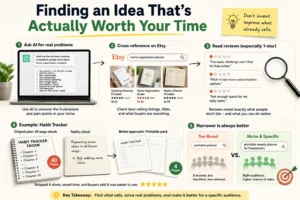
The mistake most people make here is trying to come up with something completely original. You don’t need to invent anything. You need to find something that sells and make a slightly better version of it.
I ask AI something like “what are the ten most common complaints people have about home organization products” and then cross-reference whatever comes back against real Etsy listings. Looking at the reviews on top sellers tells me more than any brainstorming session ever could. One-star reviews especially. People get specific when they’re annoyed.
The habit tracker I mentioned earlier almost became a forty-page ebook. I had this whole outline, chapters, subheadings, the works. Then I actually looked at it and realized I was basically saying the same thing eight different ways. Stripped it down to a printable pack, cut my work time in half, and the buyers who left reviews said it was easier to use than the ones they’d tried before.
Narrower is almost always better. “Printable weekly planner for freelancers” will outsell “printable planner” every time because the person searching for it already knows they want it.
Picking a Format That Fits the Idea
Not everything needs to be an ebook. That’s probably the most common beginner mistake after skipping the demand check.
| Idea Type | Best Format | Typical Effort |
|---|---|---|
| Recipes or routines | Printable or short guide | Low |
| Teachable skill | Mini course or workbook | Medium |
| Design assets | Templates or graphic packs | Medium |
| Deep knowledge topic | Full ebook | High |
If the idea is something visual or something people will print and use, make it a printable. If it’s something you’d normally explain by talking someone through it step by step, a short course or video series makes more sense. If it’s genuinely deep knowledge that takes real time to absorb, an ebook can work. But be honest about whether it actually needs to be that long.
The Tools Worth Using
People ask me this constantly. My honest answer is that the tool matters less than most people think, but here’s what I’ve actually used and what each one is good for.
| Tool | Primary Use | Pricing | Learning Curve |
|---|---|---|---|
| ChatGPT | Writing and brainstorming | Free tier available | Easy |
| Claude | Writing and research | Free tier available | Easy |
| Canva | Design, templates, layout | Free tier available | Easy |
| Midjourney | AI-generated illustrations | Subscription only | Moderate |
For writing, I usually start in ChatGPT to get a rough outline, then move to Claude for longer sections because it tends to handle extended writing better without losing the thread. For design work, Canva is hard to beat for printables and templates, mostly because you can stay in one tool for the whole thing. Midjourney, I only use it when I need original art, and I’m willing to spend time getting the prompts right.
None of these replaces judgment. They speed up the parts that are just mechanical.
If you’re trying to decide between the two, I also compared Claude AI vs ChatGPT in detail, including which one performs better for writing, brainstorming, and editing tasks.
Actually Making the Thing
For writing-based products, the process that works for me goes like this. Rough outline first, written by hand or typed quickly, not AI-generated. Then I’ll ask AI to expand one section at a time. Then I rewrite the whole thing because the AI version almost always sounds like a Wikipedia article.
That last step is non-negotiable. I skipped it on an early ebook and the reviews said things like “feels generic” and “nothing you couldn’t find for free online.” Both of those were fair. The content was fine but it had no voice. Nobody could tell a real person had written it.
For visual products like templates, Canva’s AI features handle the boring parts: resizing for different formats, suggesting color combinations, and filling in placeholder text. The actual design decisions still need a human eye. What looks good in a thumbnail doesn’t always work when someone prints it out.
For courses, AI is genuinely useful for lesson outlines and quiz questions. The recording is on you. People pay for courses because they want to learn from a person, not because they can’t find the information anywhere else.
Making It Sound Like a Human Wrote It
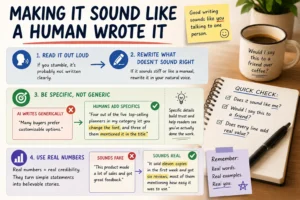
Read it out loud. That’s it. That’s the whole trick.
If you stumble over a sentence while reading it, rewrite the sentence. If a paragraph sounds like it was pasted from a health and safety manual, rewrite the paragraph. If you wouldn’t say it that way to a friend explaining something over coffee, it needs to change.
The other thing that helps is specificity. AI writes in generalities. “Many buyers prefer customizable options.” Okay, sure. But what I actually noticed was that four out of the five top-selling planners in my category let you change the font, and three of them specifically mentioned that in the product title. That’s a real observation. It sounds different. Readers can feel the difference even if they can’t explain why.
Numbers help too, as long as they’re real. I don’t mean made-up statistics. I mean the actual thing you saw: eleven sales, forty-page outline, six reviews, whatever. Those details are what separate writing that sounds lived-in from writing that sounds generated.
Design That Actually Works
Five fonts looked creative in my head. It looked chaotic on screen and even worse printed out. The planner sat at the bottom of the search results for two months.
I switched to two fonts, added more breathing room between sections, and used one accent color instead of four. Sales picked up that week. I’d like to say I figured this out through research but really, I just copied what the top sellers were doing and it worked.
The rule I follow now: if removing something doesn’t make the page feel empty, remove it. White space isn’t wasted space. It’s what makes the content readable.
AI design tools can help with color palettes and quick formatting, but they won’t tell you when something is too cluttered. For that, you need someone who hasn’t been staring at the file for three hours. Even just showing it to one other person before publishing catches things you’ve gone blind to.
Pricing Without Guessing
New listing with no reviews? Price it a bit under what competitors charge. Not dramatically lower, just enough that a buyer on the fence picks you over someone with the same product and fifty reviews.
Once you have reviews, raise it. People read into price. A $4 printable and a $9 printable feel different even before anyone reads the description.
The comparison I mentioned earlier: I noticed that most bundles selling for under $6 had around eight pages. Mine had fifteen pages and I’d priced it at $7. Once I saw that, I moved it to $9 and the conversion rate barely changed. The people who wanted it still bought it. I was just leaving money on the table before.
Where to Actually Sell It
| Platform | Best For | Strength | Weakness |
|---|---|---|---|
| Etsy | Printables, templates | Built-in search traffic | Competitive, fees add up |
| Gumroad | Creators with an audience | Simple, full price control | Almost no organic discovery |
| Amazon KDP | Ebooks | Massive reach | Strict formatting, low margins |
| Teachable or Podia | Courses | Purpose-built for lessons | More setup, needs audience |
Etsy is where I started because it has built-in traffic. People go there to buy things, which is different from most platforms, where you have to bring your own audience. The tradeoff is that it’s crowded and the fees are real.
Gumroad makes more sense once you’ve built some kind of following, even a small one. If you’ve got an email list or a decent social following, you keep more of the money and have more control.
Marketing Without Spending All Day on It
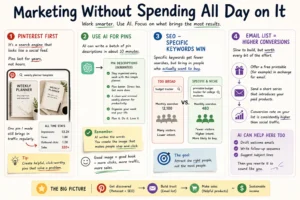
Pinterest first. I know it sounds like 2014 advice, but it genuinely works for visual products. It’s a search engine that also looks like a social feed, and pins have a shelf life measured in years rather than hours. One pin I made for a weekly planner template still brings in traffic regularly.
AI can write a batch of pin descriptions in about ten minutes. The image still needs to look like something a person would actually stop and click.
For SEO, specific keywords beat broad ones every time. “Printable budget tracker for college students” gets fewer searches than “budget tracker,” but the people searching for it are much more likely to buy. That’s the trade worth making.
Email is slow to build and worth every bit of the effort. I give away a small free printable in exchange for an email address, then send a short series introducing a few paid products. The conversion rate on that list is consistently higher than any social traffic I get. AI can draft the email sequence in an afternoon. You’ll still need to rewrite it to sound like yourself, but the structure is there.
Copyright Stuff Worth Knowing Before You List
This section exists because I didn’t know any of this when I started and learned it the hard way.
AI-generated content doesn’t automatically come with full copyright protection in every country. The rules are still being worked out and they vary depending on where you are and how much human input went into the final product. That’s one more reason the editing step matters.
Every AI tool has its own commercial use terms. Some give you full rights by default, some require a paid tier, some have restrictions on certain use cases. Read the terms for whatever tool you’re using. Assuming you’re covered because you paid for a subscription isn’t the same as actually being covered.
Etsy now requires disclosure when a listing includes AI-generated content. Other platforms have stricter rules. These policies change often enough that checking the current version before you list something new is just good practice.
None of this is legal advice. If you’re selling at any real volume, a quick conversation with someone qualified is worth it.
Mistakes That Will Cost You Time
Posting the first AI draft without editing it is the fastest way to get reviews that say “generic” and “not worth it.” The raw output is a starting point, not a finished product. Every single time.
Making something too broad because you want to appeal to everyone. “Life planner” sounds bigger than “weekly planner for remote workers.” It will also sell less because nobody feels like it was made for them.
Ignoring the platform’s content rules before uploading. Especially with AI-generated images. Listings get removed without much warning when they violate policies, and sometimes account restrictions come with it. Five minutes of reading the current rules before you upload saves a lot of headaches.
What to Actually Expect in the First Few Months
The first month, I made just over thirty dollars. The second month was somewhere in the seventies or eighties. It didn’t start feeling real until a few months in when I had a small catalog built up and a couple of products had enough reviews to show up in search properly.
AI makes each product faster to build. A printable that might have taken a full weekend now takes a Saturday afternoon. But it doesn’t compress the time it takes to build a catalog, get reviews, figure out what sells in your niche, and develop an eye for what works in your market. That part still takes the months it takes.
Anyone selling you “make $5,000 in your first month with digital products” is leaving out the part where they already had an audience or they got very lucky with one product going viral. Both of those things happen. Neither of them is a strategy.
Frequently Asked Questions (FAQs)
Q1. Do you need design skills to start?
No. Canva has enough templates that someone with no design background can make something that looks professional. The taste develops over time. Start ugly and improve.
Q2. How long does the first product take?
A simple printable, honestly, a few hours if the idea is clear. An ebook with real content, figure a week minimum if you’re also editing and formatting it properly. A course takes as long as it takes because recording and reviewing footage is just slow.
Q3. Can you sell AI-generated images on Etsy?
Currently, yes, with disclosure, but this has changed before and will probably change again. Check the current policy, not the blog post from eighteen months ago.
Q4. Does AI make the final product worse?
Only if you publish the raw output. If you edit it, add your own voice, and put in real specifics, it can be just as good as something written from scratch. Sometimes better because the structure is already there and you’re only fixing the parts that sound hollow.
Q5. What’s the easiest first product to make?
A printable. Low effort to make, quick to test, cheap to buy, so people take a chance on it without much thought. Make one, list it, learn what happens. Then make another one.
Conclusion
The blank page was never the real problem. The real problem was that I kept waiting until I had a perfect idea before I’d let myself start. AI fixed that because it gave me something to react to, and reacting is so much easier than creating from nothing.
The products that sell best for me are the ones where I edited the AI output so heavily that it barely resembles what the tool originally produced. The structure came from AI. The voice came from me. That split is probably the most accurate description of how this actually works.
You’ll make something that doesn’t sell. That’s not failure, that’s data. Make another one.
If you’d like a broader step-by-step strategy beyond AI tools, I also put together a complete guide on how to sell digital products without investment.
 Topic Person