
How to Create and Sell a Digital Product on Gumroad as a Beginner
The first digital product I ever considered selling was a simple spreadsheet I had built for myself. At the time, I assumed I needed a website, a payment gateway, and some technical knowledge before I could sell anything.
That assumption is worth questioning. After researching creator platforms, I found that Gumroad removes most of the barriers beginners usually face. You sign up, upload a file, set a price, and share the link. No monthly fee, no hosting bill, no developer involved.
This guide covers the full process, from picking a product idea to writing a listing that gets found, including how fees actually work and what most beginner guides leave out.

What Buyers Are Actually Looking For
Nobody wakes up thinking “I need more PDFs.” What people want is a faster way to finish something they are already trying to do.
That shift in thinking changes how you build a product. A resume template that helps someone land interviews in a specific industry is useful. A generic “career guide” is forgettable. Same effort to create. Very different results.
Products that sell well on Gumroad tend to fall into these categories:
| Who You Are | What You Can Sell |
|---|---|
| Student | Exam notes for one specific subject |
| Freelancer | Proposal, invoice, or contract template |
| Designer | Canva social media or branding kit |
| Remote worker | Weekly planner or task tracker |
| Teacher or tutor | Printable worksheet or lesson plan pack |
One audience. One problem. One clean solution. That combination works far better than trying to appeal to everyone.
Where Good Product Ideas Actually Come From
Most people overthink this. The best product you can sell is probably something you already built for yourself and forgot about.
Check your Google Drive right now. Is there a spreadsheet you use every week? A checklist you follow before submitting client work? A template you made because nothing else fit what you needed?
That is a product. You already solved the hard part.
Before building anything, spend twenty minutes searching Gumroad for similar listings. If comparable products exist and have reviews, demand is confirmed. If nothing shows up, either you found a gap or there is no market. A quick Google search for the same idea will tell you which one it is.
Narrow beats broad every time. A “client onboarding checklist for freelance web designers” will connect with its exact audience immediately. A “business productivity bundle” connects with nobody in particular.
Building the Product: What Tool to Use for What
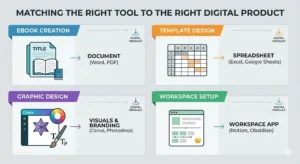
This is the section most guides leave vague. Here is the practical breakdown.
Writing an ebook or guide. Use Google Docs. Structure it with proper headings. When it is done, export as PDF. PDF renders consistently across every device and cannot be accidentally edited by the buyer. Keep it between 15 and 30 pages. Longer is not better. More focused is better.
Spreadsheet template. Built in Google Sheets or Excel. Export as XLSX so buyers can edit it in whichever tool they prefer. Add a tab called “Start Here” with simple step-by-step instructions. Fill the main sheet with dummy data so the layout makes sense immediately, without needing to read anything.
Canva template. Design inside Canva. When ready, go to Share and generate a template link. Buyers click it, copy the design into their own Canva account, and customize freely. No file export needed. Just deliver the link inside a short PDF.
Printable planner or worksheet. Design in Canva. Export as PDF. If there is any chance your buyers are outside your country, include both A4 and US Letter sizes. Plenty of sellers have been surprised by how many buyers email asking for the other format.
Notion template. Build the template in Notion. Duplicate it as a shareable template link. Deliver it in a PDF that includes one or two screenshots showing exactly how to copy it to their own workspace. First-time Notion users especially need this.
Go through the final product once as if you have never seen it before. If anything is confusing, either fix it or add a note. Confused buyers leave bad reviews or ask for refunds, not both.
Optimizing Your Gumroad Listing for Search
Most sellers write their title and description once and never think about it again. That is a missed opportunity.
Both Gumroad search and Google pull results based on the words inside your title and description. Buyers type specific phrases when they search, and your listing needs to match those phrases naturally.
Title is the most important place to start. Vague titles miss buyers completely.
Weak: “Budget Planner” Strong: “Monthly Budget Planner Spreadsheet for Freelancers — PDF and Excel”
The stronger version includes what the product is, who it is for, and what format it comes in. All three are things buyers actually type.
Inside the description, use the same language your buyer would use when describing their own problem. If you are selling a resume template for recent graduates, write “resume template for recent graduates” somewhere in the description, not just “professional resume template.” Small difference, but it matters for search.
Naming your product images descriptively can help keep your files organized and may provide additional context for search engines compared to generic filenames like “IMG_4823.png.”
Include the product format clearly, whether that is PDF, Excel, Canva, or Notion. Buyers often filter by what tool they already use, and including the format removes doubt before they even read the full description. It can also improve click-through rates because buyers immediately know whether the product works with the tools they already use.

Gumroad Fees: What “Free” Actually Means
The platform has no monthly fee. That part is accurate.
What it does charge is a percentage of each sale. New accounts start at 10 percent. As your total earnings on Gumroad grow over time, that rate comes down. On top of that, payment processing through Stripe or PayPal adds roughly 2.9 percent plus 30 cents per transaction.
Sell a $10 product and you keep around $8.40 after both cuts.
No fee to sign up. No fee to upload. No fee to list ten products or a hundred. The only cost kicks in when you actually earn something, which makes it a genuinely low-risk starting point.
If you want to compare Gumroad with other marketplaces before choosing a platform, you can also check our guide on Best Websites to Sell Digital Products Online.
Setting Up Your Profile
Profile setup takes under ten minutes. Do not skip it.
Buyers check creator profiles before purchasing, especially from someone with few or no reviews yet. An empty profile with no photo and no description creates doubt. A clear photo, a specific bio, and a sentence about who your products help remove that doubt.
Write the bio for one person, not for everyone. “I make budget spreadsheets for freelancers who hate dealing with numbers” is specific and speaks directly to someone. “I create useful digital products,” says nothing to anybody.
Writing a Listing That Actually Gets Clicks
Gumroad asks for five things when you add a product: title, description, file, price, and cover image. All five affect whether buyers click and whether they buy.
Title
This is where most listings lose buyers before they even open the page.
Weak: “Planner Template” Strong: “Weekly Planner for Freelancers — Printable PDF, A4 and US Letter”
The stronger version tells the buyer exactly what it is, who it is for, and what format they will receive. It also contains phrases real people type into search bars, which matters for both Gumroad search and Google.
Description
Answer four questions and stop. What is inside? Who is it for? What problem does it fix? What can the buyer do after using it?
Short sentences. A brief feature list if the product has multiple parts. No inflated promises. Honest descriptions reduce refund requests because buyers know precisely what they are getting.
Cover image
Show the actual product. A planner listing should show a real planner page. A spreadsheet listing should show the actual layout. Use Canva to put together a clean mockup in thirty minutes. Buyers make quick visual decisions, and a screenshot of the real product is more convincing than any graphic.
How People Find Your Product
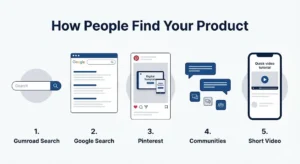
Uploading and waiting is not a plan. Here is how discovery actually works.
1. Gumroad search
Buyers searching directly on Gumroad see results based on your title and description. Specific, clear language in both places means your listing appears for the right searches.
2. Google search
Some Gumroad product pages rank in Google. If your title contains phrases buyers type into Google, your listing can appear to people who have never heard of Gumroad. “Weekly planner for freelancers PDF” is a real search term. “Planner template” is too broad to rank for anything useful.
3. Pinterest
Consistently effective for visual products like planners, templates, and printables. Create a pin showing the product and link it directly to the listing. It takes twenty minutes and can drive traffic for months without any ongoing effort.
4. Communities
Reddit threads, niche Facebook groups, Discord servers, and online forums in your topic area. Join them. Be genuinely helpful. When the product fits naturally into a conversation, share it. Forced self-promotion in communities gets ignored or banned. Helpful contributions build real trust.
5. Short video
A 45-second screen recording showing how to use a spreadsheet or planner does more than any graphic. People want to see how it works before paying.
Pricing Without Guessing
| Product Type | Where to Start |
|---|---|
| One-page checklist or simple template | $3 to $7 |
| Multi-sheet spreadsheet with instructions | $9 to $19 |
| Ebook or written guide (15 to 35 pages) | $7 to $15 |
| Notion dashboard or planner system | $10 to $25 |
| Canva template pack | $9 to $20 |
| Detailed business guide or resource kit | $19 to $45 |
Start lower. Collect a few honest reviews. If buyers are satisfied and the product genuinely solves the problem, the price can go up. Starting at a premium price with zero reviews slows everything down.
What to Do With Buyer Feedback
The first version of any product has gaps. Expect it.
Watch the questions buyers ask before and after purchasing. When the same question comes up three or four times, it means something inside the product is unclear or missing. Fix it. Then update the listing to mention the improvement.
That update becomes a free reason to share the product again. “Version 2 now includes a mobile-friendly layout” is a legitimate announcement, not a spam post.
Mistakes That Cost Beginners Time
Building before validating. Search for demand before spending days on creation. Twenty minutes of research saves weeks of wasted work.
Too broad an audience. “For anyone who wants to stay organized” competes with every app and planner in existence. “For freelance designers managing multiple client projects” is something a specific person immediately relates to.
Skipping the cover image. A listing without a real visual preview looks unfinished. Buyers scroll past it.
Describing features instead of outcomes. A twelve-column spreadsheet is a feature. “Track every invoice and know exactly who owes you money at a glance” is an outcome. Buyers purchase outcomes.
Selling digital products is one of the simplest forms of e-commerce because there is no inventory or shipping involved. Beginners can learn more in How To Get Started In E-Commerce.
FAQ
Q1. Is Gumroad actually free?
No monthly fee. Gumroad takes roughly 10 percent of each sale plus standard payment processing fees. The percentage drops as your earnings on the platform increase. You pay nothing until you sell something.
Q2. Can I sell Canva templates on Gumroad?
Yes. Build the template in Canva, generate a shareable template link, and deliver it inside a PDF with instructions. It is one of the most common product types on the platform and requires no file download from you.
Q3. How do I get my first sale?
Share in a community where your exact buyer already spends time. One well-placed post in a relevant subreddit, Facebook group, or forum moves faster than broadcasting to a general audience. Pinterest also produces consistent early traction for visual products.
Final Thoughts
Gumroad handles payments, delivery, and the storefront. What it cannot do is validate your idea, write a clear title, or get your product in front of the right people. That work belongs to you.
One product. One audience. One real problem was solved well. Start there.
Gumroad is one option, but there are several other ways to start selling digital products without upfront costs. I covered additional methods in my guide on “How to Sell Digital Products Without Investment in 2026-2027.”
 Abdullah Waheed