

AI Tools That Help Solopreneurs Save Time and Grow Faster
Running a solo business sounds freeing. And it is, until Monday morning arrives and you realize you are the marketing team, the support desk, the accountant, and the writer, all before lunch.
While managing my own projects and content websites, I started testing AI tools to reduce repetitive work. Not because they sounded exciting. Mostly because I was exhausted and needed a way out of the cycle. What I found changed how I approach almost every task in my workday.
This is not a roundup of tools I skimmed once. It covers what I tested, what held up over time, and where other independent operators saw measurable shifts in their output.
How I Evaluated These Tools While working across multiple content projects and small business setups, I tested more than a dozen AI productivity tools over the past year. Evaluation covered actual usage across writing, customer support, research, scheduling, and finance tasks. Pricing comparisons, free plan limitations, and real feedback from solopreneur communities were all factored in. The goal was to find what genuinely saves time, not just what sounds good in a demo.
The Real Bottleneck Is Not Skill. It Is Bandwidth.
Most solopreneurs I come across are capable. Skilled, even. That is rarely the issue.
The problem is sustaining 40 hours of focused output across five different job roles every single week. Something always slips. Usually the task that matters most is the one that demands the most mental energy to even begin.
Over time, I noticed a pattern. The work I avoided the longest was never the hardest. It was the most repetitive. Rewriting the same onboarding reply. Reformatting the same report. Posting on channels where the content was already planned but never actually scheduled.
That is precisely where AI earns its place. Not replacing the creative or strategic parts of the job. Just removing the fog around them so you can actually reach them.
If you are thinking about building a broader digital business around this kind of leverage, the beginner’s guide to starting an AI agency covers how solo operators are packaging AI skills into full-service offerings.
Writing and Content: Where the Most Hours Disappear
Let me be direct. Content creation used to consume more of my weekly schedule than anything else combined.
A blog post. A newsletter. Three captions. A product description revision. Before I noticed, half a Wednesday was gone and client work had not been touched. What surprised me most was that the lost time was not the actual writing. It was starting. Staring at the cursor. Rewriting the opening sentence repeatedly until it felt right enough to continue.
After comparing several tools, I found that Claude and Jasper handled first drafts in a way that felt genuinely usable. You give them context, audience, and goal. What comes back still needs your voice and your edits, but the blank page disappears.
Copy.ai works better for short-form specifically. Ad copy, email subject lines, product blurbs. For longer editorial content, Claude holds up better because the reasoning stays structured through a full piece.
One thing that became obvious after using Claude regularly: it works especially well for consultants, bloggers, and service-based businesses producing long-form content. Jasper suits brand-driven marketing teams more. Copy.ai fits solopreneurs who need volume in short formats fast.
Writing Tools: Pricing and Fit
| Tool | Free Plan | Paid Starting Price | Best Fit |
|---|---|---|---|
| Claude | Yes (limited) | Around $20/month | Long-form content, research, editing |
| Jasper | No (trial only) | Around $49/month | Marketing copy, brand voice |
| Copy.ai | Yes (limited words) | Around $36/month | Short-form, email, ads |
A brand strategist I know was building every client proposal from scratch. Six hours every week for a format that was 70 percent identical each time. She started using an AI writing tool to handle structure and boilerplate, then focused her time on the custom insight sections. Those proposals now take around 80 minutes. Same quality for her clients. Completely different cost to her calendar.
For anyone thinking about turning writing skills into income, the options around content writing as a career path have expanded significantly alongside these tools.
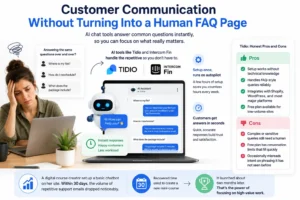
Customer Communication Without Turning Into a Human FAQ Page
There is a specific kind of exhaustion that builds from answering the same question for the 30th time. When you sell anything online, whether a course, a service, or a product, a significant share of incoming messages are nearly identical.
Where is my file? How do I reschedule? What does the package include?
I discovered that tools like Tidio and Intercom’s Fin handle these without any involvement after initial setup. The configuration takes a few hours once. Then it runs on its own. Customers get responses in seconds. You check in only on what the system flags as unresolved.
Tidio suits startups and early-stage solopreneurs well because setup requires no technical background and it integrates with most website platforms cleanly. For ecommerce specifically, it handles order status queries and product questions effectively, which is where support volume tends to be highest.
Intercom Fin is a stronger fit once you have a growing user base and need more sophisticated conversation routing.
Tidio: Honest Pros and Cons
Pros:
- Setup works without technical knowledge
- Handles FAQ-style queries reliably
- Integrates with Shopify, WordPress, and most major platforms
- Free plan available for low-volume sites
Cons:
- Complex or sensitive queries still need a human
- Free plan has conversation limits that fill quickly
- Occasionally misreads intent on phrasing it has not seen before
A digital course creator set up a basic chatbot on her site. Within 30 days, the volume of repetitive support emails dropped noticeably. She put that recovered time toward building a follow-up mini-course. It launched about two months later. That is what happens when high-value hours stop going toward low-value tasks.
Social Media: The Task That Quietly Destroys Consistency
Posting regularly sounds manageable until you are three weeks in and realize nine days have passed without a single update, not because you did not care, but because you ran out of mental bandwidth by the time you got to it.
The fix that actually held was not discipline. It was removing the daily decision entirely.
With tools like Buffer and Predis.ai, content gets batched in one session, usually a few hours on a Sunday, and scheduled across the week or month. The AI features help generate post variations, repurpose existing material, and suggest publishing windows based on audience activity patterns.
Lately deserves separate mention. It pulls from longer content formats such as podcasts, videos, and blog posts, then generates social versions from them. For solopreneurs already producing content in one format, that single piece becomes five or six posts without restarting from scratch.
A personal finance educator was uploading YouTube videos every week but posting on LinkedIn perhaps twice a month. After feeding video transcripts into an AI scheduling tool, he moved to four posts a week. Inbound inquiries, including speaking opportunities, started arriving without any outreach. The ideas did not change. The visibility did.
If you are building content consistently and want to understand how search visibility connects to that effort, the complete SEO guide for beginners explains how both channels work together.
Admin and Finance: The Invisible Time Drain
Nobody launches a solo business because they love reconciling monthly bank statements. And yet here we are, every month end, staring at a spreadsheet trying to remember whether that transaction was a software renewal or a client dinner.
From my experience, this is where AI tools offer some of the most overlooked value. Not because the tasks are interesting, but because the cumulative time loss is invisible until you calculate it across a full year.
Tools like Fyle and QuickBooks with AI features auto-categorize transactions, flag spending anomalies, and generate monthly summaries in readable language. Some send nudges before invoices go overdue, which matters more than it sounds when cash flow is tight.
For freelancers based in Pakistan, India, or other international markets where QuickBooks pricing feels steep or regional support is limited, there are practical alternatives worth knowing.
Zoho Books supports multi-currency invoicing, is widely used across South Asia and the Middle East, and has a free plan for businesses under a certain revenue threshold. Wave is fully free for core accounting features and works well for service-based freelancers who need simple income and expense tracking without monthly fees.
Finance Tools by Situation
| Tool | Free Plan | Best For | Regional Notes |
|---|---|---|---|
| QuickBooks | No | Established solopreneurs, US-based | Strong US/UK tax features |
| Fyle | Trial only | Service businesses, expense tracking | Works internationally |
| Zoho Books | Yes (revenue limit) | Freelancers in Asia, Middle East | Solid multi-currency support |
| Wave | Yes (core features) | Early-stage, budget-conscious | Available in most countries |
| Keeper | No | Tax-focused freelancers | Primarily US market |
A web designer shared that he used to spend four to five hours every month on admin. After switching to an AI-assisted bookkeeping tool, the same work took under an hour. He called it getting a full working day back every few weeks. Across twelve months, that is meaningful recovered capacity.

Research: From Hours of Browsing to Actual Clarity
Staying current on an industry used to mean blocking out two or three hours for reading, bookmarking, and manually synthesizing what seemed relevant into something actionable.
The problem is that by the time the reading is done, the energy to act on it is gone.
While researching options for a content site in a competitive niche, I started using Perplexity for topic exploration and competitive analysis. The difference was immediate. Instead of 20 browser tabs that I kept deferring, I was getting structured summaries with verifiable sources I could follow up on selectively.
But Perplexity is not the only option worth knowing. The research tool landscape has expanded.
ChatGPT Deep Research works well for synthesizing complex, multi-source topics. It reads across a wider range of document types and handles nuanced questions with more depth than a standard search. Best for strategic questions where you need breadth.
Gemini Deep Research connects well with Google’s index and tends to surface more recent content. For news-adjacent research or fast-moving topics, it often finds more current material than other tools.
Perplexity stays strongest for quick, source-cited answers on specific factual questions. The interface is clean, the citations are visible, and the answers load fast without unnecessary padding.
Research Tools Compared
| Tool | Strength | Best Use Case | Free Access |
|---|---|---|---|
| Perplexity | Fast, cited answers | Competitive research, fact-checking | Yes |
| ChatGPT Deep Research | Multi-source synthesis | Strategic analysis, long reports | Paid tier |
| Gemini Deep Research | Recent content, Google index | News topics, trending subjects | Paid tier |
What I realized is that research itself was never the bottleneck. The bottleneck was extracting useful insight from noise fast enough to make a decision the same day.
A founder preparing to launch a SaaS product used Perplexity to map her competitive landscape in a single afternoon. Pricing models, recurring complaints from competitor reviews, and gaps in how competitors positioned themselves. What would have taken several days of manual browsing became a focused two-hour session. The positioning clarity she gained directly shaped how she wrote her landing page copy.
Design Without a Design Background
Not every solopreneur has a design instinct. After testing different approaches over time, the tools that actually closed that gap were not the most complex ones.
Canva’s AI features changed more than expected. Brand kits keep visual output consistent across formats. The AI design suggestions are genuinely useful for someone who understands what looks wrong but does not know the vocabulary to fix it. Adobe Firefly handles AI image generation well when stock photography does not cover what a marketing piece needs.
Looka is worth trying for early-stage brand identity work when professional design budgets are not available yet. It is not what a skilled designer would deliver. But it is substantially better than most DIY alternatives and can serve as a starting point that a designer refines later.
A nutrition coach with no design background built her full visual identity over a weekend using Canva Pro. Logos, social templates, lead magnet layouts. She estimated that outsourcing the same scope to a freelance designer would have cost several hundred dollars. Instead she paid for one month of software access.
If selling Canva templates is something you are considering as a side income stream, the guide to selling Canva templates online walks through how other solopreneurs have turned that design skill into a product.
Selling Digital Products: Where AI Output Becomes Income
One of the more underrated shifts happening right now is solopreneurs using AI tools to create sellable digital products rather than just internal efficiency.
Templates, guides, mini-courses, prompt packs, swipe files. These are all products that AI tools can help draft, format, and prepare for sale. The actual value still comes from your knowledge and judgment. But the production time drops significantly.
For anyone exploring this direction, the options for selling digital products without upfront investment have expanded alongside these tools. Platforms like Gumroad make entry straightforward, and the comparison between Etsy and Gumroad for digital products is worth reading before choosing where to list.
Full Tool Overview: Time Saved by Category
| Task | Tools to Consider | Estimated Weekly Time Recovered |
|---|---|---|
| Long-form writing | Claude, Jasper | 3 to 5 hours |
| Short-form and copy | Copy.ai | 1 to 2 hours |
| Customer support | Tidio, Intercom Fin | 3 to 5 hours |
| Social scheduling | Buffer, Predis.ai, Lately | 2 to 4 hours |
| Finance (US/UK) | QuickBooks, Fyle, Keeper | 3 to 4 hours monthly |
| Finance (international) | Zoho Books, Wave | 3 to 4 hours monthly |
| Research | Perplexity, ChatGPT, Gemini | 2 to 4 hours per project |
| Design | Canva AI, Adobe Firefly, Looka | Varies by volume |
These are directional estimates. Results depend on how well each tool is configured and how consistently it is used.
The Mistake Most Beginners Make
The biggest mistake beginners make is trying to adopt six new tools at once.
Nothing gets properly configured. Nothing becomes a habit. After two weeks of context-switching between platforms that are all half set up, most people abandon the experiment and conclude AI tools are overrated. That conclusion is wrong, but the experience that led to it is understandable.
The approach that held up was choosing one task, the most draining one, and finding one tool built for it. Using it for 30 days before adding anything else. By the end of that month, the habit was established and the time savings were visible enough to justify the next step.
Start narrow. Go deep. Then expand from a stable foundation.

Frequently Asked Questions
Q1. Do I need technical skills to start using these AI tools?
Most tools covered here are designed for non-technical users. If you can navigate Gmail and use a basic spreadsheet, you have enough to get started with the majority of them. Some integrations require a setup session, but most platforms include guided onboarding that walks through each step.
Q2. Are free versions worth using or are they just limited teasers?
It depends on the tool. Canva’s free plan is genuinely usable for a long time. Tidio’s free tier fills up quickly if your site has real traffic. Buffer’s free version works for one or two channels. Wave’s free plan covers core accounting with no time limit. In most cases, the free version is enough to evaluate fit before committing to paid access.
Q3. What if AI-generated content does not sound like me?
That is the right concern to have. Treat AI output as a draft, not a finished product. Your job shifts from writing from nothing to editing something that already has structure. Over time, as you refine how you prompt the tool and what you ask for, the gap between the raw draft and your natural voice becomes smaller.
Q4. Can these tools actually reduce the need to hire, or is that overstated?
For specific tasks, yes. Repetitive writing, basic visual design, FAQ-level customer support, and transaction categorization are all areas where AI reduces or removes the need to outsource. For high-judgment work, client relationship management, or creative strategy, they do not replace a skilled person. The honest answer is partial: they replace some outsourcing, not all of it.
Q5. How much should I expect to spend monthly on a basic AI tool setup?
A starter stack covering one writing tool, one scheduling tool, and one admin tool typically runs between $40 and $100 per month depending on plan tiers. For international freelancers using tools like Wave and Canva Free alongside one paid writing tool, that figure can be lower. The time recovered each week generally offsets the cost quickly.
Final Thoughts
The solopreneurs growing fastest right now are not always the most talented people in their category. They have figured out where their hours actually go and built systems that protect the ones that matter most.
AI tools are not a way around doing good work. They are a way to do substantially more of it without adding hours to a day that does not have room for them.
The version of any solopreneur who handles everything manually is not more dedicated. Just more tired. And tired operators make slower decisions, produce thinner work, and burn out faster than the work requires.
Pick the single task that drains the most energy each week. Find the tool built for that specific problem. Give it 30 days of consistent use. See what you choose to do with the capacity you get back. That is where the real answer to this question lives.
If you are thinking about how to start a blog and build income through it, the systems covered in this article apply directly to how sustainable content operations are built by people working alone.
Information in this article reflects publicly available details at time of writing. Pricing and features change over time. Individual results vary based on business type, use case, and how each tool is implemented.
 Topic Person