
ChatGPT vs Gemini: Which One Is Better for Content Writing and Generating Images?
Table of Contents
- Introduction
- Quick Side-by-Side Overview
- What ChatGPT Actually Is
- What Gemini Actually Is
- Writing Quality
- SEO Content and Blog Writing
- Long-Form Articles
- Creative Writing and Marketing Copy
- Image Generation
- Image Editing
- Who Should Use Which Tool
- Pricing
- ChatGPT: Pros and Cons
- Gemini: Pros and Cons
- Alternatives
- Category Winners Summary
- Frequently Asked Questions
- Final Thoughts
Introduction
I had both tools open at the same time. Laptop getting warm, two browser tabs, same prompt pasted into each. I was not trying to write a review. I just wanted to know which one I would actually reach for on a Monday morning when something needed to get done.
Turns out the answer is messier than most comparison articles admit.
Neither tool is useless. Neither is perfect. What I found after running the same tasks through both for several days is that they are genuinely different in ways that matter depending on what kind of work you do. The blog-writing person and the research-heavy person should probably land on different answers.
To keep things fair, I used the same prompts across both platforms the entire time. Same brief for blog posts. Same scene description for images. Same email copy request. Same long article outline. I also spread the tests over multiple days rather than doing everything in one afternoon, because I wanted to catch inconsistencies rather than lucky good days.
Everything in this article is from that process.
Quick Side-by-Side Overview
| Task | ChatGPT | Gemini |
|---|---|---|
| Blog and article writing | Excellent | Good |
| Long-form content | Excellent | Fair |
| Creative and marketing copy | Excellent | Good |
| Research and fact organization | Very Good | Excellent |
| Image generation | Excellent | Very Good |
| Complex prompt accuracy | Excellent | Good |
| Editing existing content | Excellent | Fair |
| Google Docs and Drive integration | Limited | Excellent |
| Idea generation | Excellent | Very Good |
| Ease of use for beginners | Excellent | Very Good |
The short version: Gemini is stronger when you need to organize information or work inside Google’s tools. ChatGPT is stronger when you need something written, edited, or turned into an image. That split covers most of the real differences.
What ChatGPT Actually Is
ChatGPT is built by OpenAI. The “answering questions” reputation it has is a bit reductive at this point. It writes full articles, handles long editing sessions, generates images, helps with code, and holds context across a conversation in a way that actually changes how useful it is for complex work.
The context piece is what I kept coming back to during testing. Give it a detailed brief, refine it across a few messages, and it does not forget what you told it three messages ago. That sounds minor until you are eight exchanges into a project and it still knows the tone, the audience, and the constraints you laid out at the start.
What Gemini Actually Is
Gemini is Google’s AI model. The more important thing to know is that it is woven into Google’s products in a way that no third-party tool can match right now. Gmail, Docs, Drive, Sheets — Gemini can work inside all of them rather than alongside them.
For pulling information together fast or summarizing a long document before you start writing, it is genuinely quick and clean. Where I found it less reliable was when I needed the output itself to be engaging rather than just accurate. Accurate and readable are different things, and Gemini does not always close that gap automatically.
Writing Quality: Which One Reads Better?
I gave both tools an identical brief: write a 400-word opening section for a travel article about solo trips in Southeast Asia.
ChatGPT opened with a specific moment. A night market. The smell of grilled meat. Then it widened out into why solo travel in that region is different. You wanted to keep reading.
Gemini opened with: “Southeast Asia is one of the most popular destinations for solo travelers worldwide.” Which is true. And reads like a Wikipedia entry.
That gap showed up consistently across different formats. ChatGPT tends to write like someone telling you something. Gemini tends to write like someone reporting something. Both have their place, but if your content needs people to actually stay on the page, the difference is real.
SEO Content and Blog Writing
Good SEO writing is not really about keywords anymore. It is about giving someone the answer they came for, in a structure that makes sense, without padding. Search engines have gotten reasonably good at detecting when a page is just filling space.
ChatGPT handled structured SEO briefs well in testing. Ask for an H1, three H2s with subpoints, a FAQ block, and a meta description, and it delivers all of it in the right order. The sections stay on topic. The FAQ questions are relevant rather than generic.
Gemini sometimes merged sections, skipped the meta description, or needed an extra message to get the structure right. Not a dealbreaker for occasional use, but if you are publishing multiple times a week, that extra correction step adds up over time.
If you want to go deeper into proper optimization techniques, “Complete SEO guide for beginners 2026-2027“ explains how to structure and rank content step by step.

Long-Form Articles
This is where things got more interesting.
For pieces under 800 words, the gap between the two tools is manageable. Past 1,500 words, ChatGPT pulls ahead noticeably. The sections connect. The voice does not shift mid-article. The argument builds toward something rather than just accumulating paragraphs.
With Gemini, I noticed tone drift in longer pieces. Not dramatically, but section three would be slightly more formal than section one, or an idea introduced early would reappear later in different wording as if the earlier mention had not happened. For a 500-word post, this is barely worth mentioning. For a 2,000-word guide being published under your name, it creates editing work you would not otherwise have.
Creative Writing and Marketing Copy
Marketing copy is where I have a strong opinion, because I have spent time actually using both for this.
Subject line test: I asked each tool for three email subject lines for a campaign promoting a productivity app aimed at freelancers.
ChatGPT’s three: a direct one, a curiosity-gap one, and a benefit-forward one. Actually different from each other.
Gemini’s three: all started with action verbs, all roughly the same structure, and one literally used the word “boost” twice across the three options.
Headline variety matters because you are trying to reach different people at different moments. If all your options sound like variations of the same sentence, you are not really testing anything.
ChatGPT is better at this. That is not a close call based on what I saw.
Image Generation: What Each Tool Can Do
I tested both with a detailed prompt: a freelancer working at a wooden desk, natural light coming from the left, a plant on the right side of the desk, laptop open, coffee mug to the right of the keyboard, and a minimal background.
ChatGPT placed nearly every element where I put it. The light came from the left. The plant was on the right. The composition read as intentional.
Gemini got the general vibe but simplified the specifics. The plant ended up somewhere in the general background area. The lighting was flat. It looked like a home office, but not the one I described.
For a generic stock-style image, that difference does not matter. For a branded visual where the details are part of the brief, it does. Art directors and brand-conscious creators will notice this faster than casual users.

Text in Images
Both tools still struggle with text inside generated images. This is a known limitation across the industry right now, not specific to either platform.
For short, simple text on a clean background, ChatGPT tends to produce more legible results. Anything involving multiple lines, specific fonts, or precise placement is still hit-or-miss on both sides. Worth knowing before you plan a thumbnail workflow around either tool.
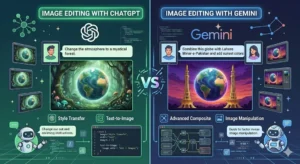
Image Editing
This came up more than I expected during testing.
When I needed to make a series of changes to a generated image, adjust the background, change a color, and remove one element, ChatGPT handled the back-and-forth better. Each follow-up instruction was built on what came before without losing track of earlier changes.
Gemini handled single-step edits reasonably well. Multi-step sessions were where it started dropping earlier context. Not every time, but enough times that I noticed a pattern.
Who Should Use Which Tool: Final Decision Table
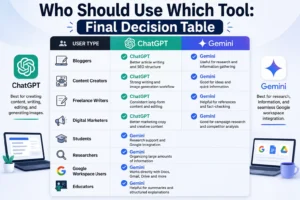
| User Type | Best Tool | Main Reason |
|---|---|---|
| Bloggers | ChatGPT | More consistent writing quality and SEO structure |
| Students | Gemini | Research organization and Google Docs integration |
| Digital
marketers |
ChatGPT | Stronger creative copy and image generation accuracy |
| Researchers | Gemini | Better at organizing large amounts of information quickly |
| Content creators | ChatGPT | Full workflow from writing to image assets in one place |
| Google Workspace users | Gemini | Native integration with Docs, Drive, and Gmail |
| Freelance writers | ChatGPT | Long-form consistency and less post-editing required |
| Educators and teachers | Gemini | Fast summaries and organized explanations |
The pattern that kept showing up: people who primarily produce content land better with ChatGPT. People who primarily process and organize information land better with Gemini.
Pricing: What You Actually Pay
Most comparison articles skip pricing or bury it. It should not be buried because the free tiers of both tools are meaningfully different from the paid ones.
ChatGPT
The free version gives you access to GPT-4o with daily usage caps. Image generation and voice mode are included but limited. ChatGPT Plus is $20 per month, removes most caps, adds priority access when servers are busy, and unlocks better image quality. There is also a Team plan ($25-30 per user monthly) for shared workspaces, and an Enterprise tier with custom pricing for larger organizations.
For individual creators doing regular work, the $20 Plus plan is where the tool becomes practical for daily use. The free version is solid for evaluation but you will hit the limits if you are trying to produce content consistently.
Gemini
The free version is available through Google’s apps and handles basic tasks well enough. Gemini Advanced is included in Google One AI Premium at $19.99 per month. That plan also bundles 2TB of Google storage and deeper integration across Gmail, Docs, Sheets, and Meet.
The storage bundle changes the math for a lot of people. If you are already paying for Google One storage, the AI Premium plan might replace that cost rather than add to it.
Value comparison
| Plan type | ChatGPT | Gemini |
|---|---|---|
| Free access | Yes, with daily limits | Yes, basic features |
| Paid plan cost | $20/month (Plus) | $19.99/month (AI Premium) |
| What paid unlocks | Higher image quality, fewer limits, priority access | Advanced model, full Google integration, 2TB storage |
| Best value for | Standalone content and image work | Google Workspace users who want AI built in |
Pricing can change. Check the current plan pages before subscribing, since both companies have updated their tiers multiple times.
ChatGPT: What Works and What Does Not
Strengths:
- Writing quality holds up in long-form content without tone drift
- Image prompts with multiple specific elements are followed more accurately
- Multi-step editing sessions retain context across many exchanges
- SEO-structured content comes out correctly formatted on the first attempt
- Creative copy variations are genuinely different from each other
Weaker spots:
- A few genuinely useful features still sit behind the paid plan
- Anything involving recent events or current data still needs fact-checking
Gemini: What Works and What Does Not
Strengths:
- Summarizing large amounts of information quickly and clearly
- Working inside Google Docs, Drive, Gmail without switching tabs
- Organizing research into categories before writing begins
- Fast responses on information-dense tasks
Weaker spots:
- The default writing tone leans toward informational rather than readable
- Long articles develop tone inconsistencies that need editing
- Detailed image prompts sometimes get simplified in the output
How to Decide Which One to Use
If your work is mostly creating articles, copy, visuals, and content calendars, ChatGPT handles that workflow more completely.
If your work is mostly researching, summarizing, or working inside Google’s tools, Gemini fits more naturally.
If the budget allows, running both in sequence (Gemini for the research phase, ChatGPT for the writing and image phase) actually removes most of the weaknesses from each. It takes some setup but it works.
Are There Other Options Worth Considering?
ChatGPT and Gemini are the most visible options right now but they are not the only ones doing serious work.
Claude is the alternative I would point a writing-heavy user toward first. It is particularly good at handling long documents and following nuanced instructions without drifting. If you paste in a draft and ask for targeted feedback, the response tends to be more specific than what you get from other tools. Free tier available, paid plan at $20 per month.
Also, you can explore the comparison between “ChatGPT VS Claude AI” to see how different AI models perform in writing tasks.
Copilot lives inside Microsoft 365. For anyone whose work happens in Word, Excel, PowerPoint, or Outlook, it removes the friction of toggling between an AI chat and the actual application. Solid for practical writing tasks. Less strong on creative work compared to ChatGPT. Available through Microsoft 365 subscriptions.
Perplexity works differently from the others. It pulls live information from the web and shows you its sources. This makes it valuable for research and fact-checking, especially on topics that change quickly. It is not the right tool for drafting polished content, but for the research phase before writing starts, it is one of the more reliable options available. Free tier exists, Pro plan around $20 per month.
Category Winners at a Glance
| Category | Winner |
|---|---|
| Blog writing | ChatGPT |
| SEO content | ChatGPT |
| Long-form articles | ChatGPT |
| Creative and marketing copy | ChatGPT |
| Research and fact organization | Gemini |
| Google Workspace integration | Gemini |
| Image generation | ChatGPT |
| Image editing | ChatGPT |
| Beginner friendliness | Tie |
| Overall for content creators | ChatGPT |

Frequently Asked Questions
Q1. Is ChatGPT or Gemini better for writing blog posts?
ChatGPT produces more readable blog content, especially past 1,000 words. Gemini can handle the task but the output often needs more editing before it reads naturally.
Q2. Can Gemini generate images the same way ChatGPT does?
Both offer image generation. ChatGPT follows detailed, multi-element prompts more accurately. Gemini performs better on simpler image descriptions where the specifics matter less.
Q3. Do I need a paid plan to use these tools effectively?
The free tiers are usable for trying things out. For consistent daily work — publishing regularly, generating images, handling long sessions — the paid plans remove enough friction to justify the cost for most active users.
Final Thoughts
I went into this expecting a cleaner answer. What I came out with is more practical.
ChatGPT is the better choice for producing content. Writing, image work, marketing copy, long-form articles. If that describes most of what you do, the decision is fairly clear.
Gemini is the better choice for people inside Google’s world. Research, organizing information, and working directly in Docs and Drive. For those users, the integration alone changes the workflow in ways that matter.
What I would actually suggest: run your own real tasks through both before committing to either. Not a test prompt you found in an article. The exact kind of work you do every week. See which output needs less fixing. That is the only comparison that actually tells you something.
 Abdullah Waheed