
How to Use Pinterest to Drive Traffic to Your Blog
When I first started blogging I spent months writing content that almost nobody read. Tried Twitter, dabbled in Instagram and even attempted Facebook groups but none of it moved the needle. Then someone mentioned Pinterest. My reaction was to roll my eyes. Wasn’t that just a place for wedding boards and banana bread recipes?
Turns out that assumption was completely wrong. Pinterest is a search engine. Not a social media platform. The difference matters more than most people realize because content published on Pinterest keeps showing up in search results for months or even years after you post it. That is not how any social network works. If you are serious about getting consistent blog readers without relying entirely on Google then Pinterest deserves a real place in your strategy. This guide shows you exactly how to use Pinterest to drive traffic to your blog even if you are starting from zero.
Table of Contents
- Why Pinterest Works Differently Than Other Platforms
- Setting Up a Pinterest Business Account
- Optimizing Your Profile
- Creating Boards That Work Like SEO Categories
- Designing Pins That Get Clicked
- Tools to Create Pinterest Pins
- Writing Pin Descriptions That Rank
- Pinning Consistently Without Burning Out
- Using Keywords the Way Pinterest Expects
- Finding Pinterest Communities
- Tracking What Is Actually Working
- Creating Multiple Pins for the Same Post
- The Reality About Pinterest Traffic
- Common Mistakes That Stall Growth
- Pinterest Traffic Checklist
- Frequently Asked Questions
- Final Thoughts
Why Pinterest Works Differently Than Other Platforms
Most social platforms punish you for being late. Post on Twitter at the wrong hour, and your content is buried within six hours. Instagram works the same way. Pinterest runs on a completely different logic and that difference is exactly what makes it worth your time as a blogger.
According to Pinterest’s own best practices the platform is built around discovery rather than real-time feeds. That means content has a much longer shelf life than anything published on traditional social media. A pin you create today can continue showing up in search results months or even years after publication. That kind of compounding reach is something most channels simply cannot offer. If you are just starting a blog, building your Pinterest presence early gives you a meaningful head start before your Google SEO gains any real traction.
Setting Up a Pinterest Business Account
Before doing anything else, switch to a Pinterest business account. It is free. Skipping this step means losing access to data you will genuinely need later on.
A personal account gives you almost nothing useful for growing blog traffic. A business account unlocks Pinterest Analytics, Rich Pins and the ability to promote content later if you ever decide to. Visit the Pinterest Business Account setup page and connect it to your blog domain. Claim your website and complete the verification process. Pinterest walks you through every step automatically. Once verified a small globe icon appears next to your URL on every pin you publish. That badge tells visitors your pins come from a verified website rather than an unverified source. Small detail but it builds real trust.
Optimizing Your Profile to Attract the Right Readers
Your profile is the first thing someone sees, and it needs to speak to one specific type of person rather than everyone scrolling past.
A lot of bloggers write bios that say something vague like “sharing helpful tips and ideas every day.” That phrase does nothing for anyone reading it. A bio like “helping new bloggers grow traffic and earn online without paid ads” immediately tells the right person that this account exists for them. Write your bio around a phrase your ideal reader would actually type into a search bar. If your blog covers content writing and freelancing just say that in plain, straightforward language. Skip the formal professional-sounding words. Use the same language your audience uses when they go looking for help.
Creating Boards That Work Like SEO Categories
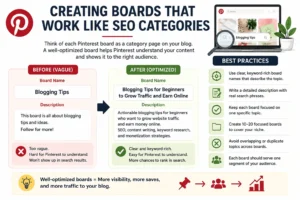
Think of each Pinterest board as a category page on your blog. Every board needs a clear keyword-rich name and a description that gives Pinterest’s algorithm enough context to understand what the board actually covers.
Changing a board name from something vague like “Blogging Tips” to something specific like “Blogging Tips for Beginners to Grow Traffic and Earn Online” and rewriting the description with actual search phrases can make a noticeable difference within a few weeks. The board begins appearing in search results for related terms simply because it now gives the system something concrete to classify. Pinterest recommends keeping boards tightly focused on a clear topic rather than mixing unrelated content across a single board. Try to build somewhere between 10 and 20 focused boards. Avoid overlapping topics that send confusing signals to the algorithm. Each board should feel like a dedicated space for one corner of your audience.
Designing Pins That Actually Get Clicked
Most pins disappear into the feed before anyone notices them. Getting a pin to stop someone mid-scroll takes some thought but the principles are not complicated once you know what to look for.
Pinterest recommends a 2:3 image ratio, which works out to roughly 1000 x 1500 pixels. Vertical pins take up more physical space in the feed, which already helps before someone reads a single word. According to Pinterest’s own creative best practices pins with a clear text overlay and a simple uncluttered background consistently perform well because the message is readable before a user even decides to tap. A warm light background with bold readable fonts works across most niches. The headline on the pin matters just as much as the image underneath it. Something specific like “How to Reclaim 2 Hours Every Morning With One Simple Shift” will outperform something vague like “Morning Routine Tips” almost every time. Specificity creates curiosity. Curiosity creates the click.
Tools to Create Pinterest Pins
The right tools make the process faster and the output more consistent. Here are three that actually get used regularly.
Canva is where most Pinterest creators design their pins. The free version includes Pinterest-specific templates that come pre-sized correctly. Swap in your own photos, adjust the fonts and match your brand colors. Once you land on a layout you like each new pin takes around 10 minutes to put together.
Tailwind handles scheduling so you are not manually pinning throughout the day. Load two to three weeks of content in one sitting and Tailwind distributes the pins at optimal times automatically. It also has a community sharing feature that gets your pins in front of audiences beyond your existing followers. Particularly useful once your account has some initial momentum.
Pinterest Analytics is built directly into the business account dashboard and it is more useful than most people realize. This is where you track which pins are actually sending people to your blog versus which ones just collect saves without converting to visits.
Saves matter because they signal Pinterest to distribute your pin to a wider audience. Outbound clicks matter because they are what actually grows your readership. A pin with thousands of saves but no outbound clicks means people liked the image but never felt compelled to visit your site. That tells you to rethink the headline or the landing page the pin points to. Watching both numbers together gives you a much clearer picture of what is actually working. Design, scheduling, data. Those three tools cover it all.
Writing Pin Descriptions That Show Up in Search
The image earns the click. The description is what tells Pinterest who should see your pin in the first place.
Write each description the way you would open a short blog post. Start with something that grabs attention in the first sentence then work in two or three relevant keywords in a way that reads naturally rather than feeling stuffed in. Pinterest has its own keyword research tool inside the Ads section and it surfaces what real users are actually searching for even if you never run a paid ad. According to Pinterest’s creator guidelines the most effective descriptions feel conversational and solve a specific problem or answer a real question. For a pin pointing to a post about ,AI tools for content creation a description like “Struggling to produce content faster? These AI tools can cut your writing time without hurting quality” works because it speaks directly to a real pain point and the keywords appear naturally inside it.
Pinning Consistently Without Wearing Yourself Out
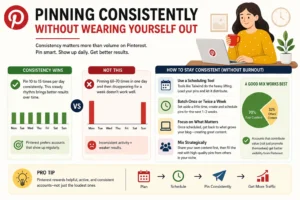
Consistency matters more than volume on Pinterest. Worth saying twice because most people approach it the other way around.
Pinning 10 to 15 times a day in a steady rhythm tends to produce noticeably better results than pinning 60 or 70 times on one day and then going quiet for a week. Pinterest responds well to accounts that show up on a regular schedule over time. You do not need to be at your computer all day to pull this off. A scheduling tool like Tailwind handles distribution once you have loaded your content in. Batch your pinning once or twice a week, schedule two weeks out at a time and then shift your focus back to writing. One thing I noticed while using the platform is that putting your own content first in the scheduling queue and then filling remaining slots with quality pins from other creators in your niche tends to perform better than only ever promoting your own posts. Accounts that feel like genuine contributors get better treatment from the algorithm than accounts that feel purely self-promotional.
Using Keywords the Way Pinterest Expects
Pinterest SEO is real. Ignoring it means your pins mostly reach people who already follow you rather than new readers who have never heard of your blog.
The algorithm surfaces content based on relevance and engagement signals. Treating Pinterest like Instagram by focusing entirely on how things look while ignoring search intent is a mistake that slows growth significantly. Pretty pins with no keyword strategy rarely generate consistent blog traffic. The shift happens when you start researching keywords before designing any pin at all. Type your topic into the Pinterest search bar and look at the bubble suggestions that appear below the search field. Those bubbles reflect real search behavior from real users on the platform. They are not suggestions Pinterest invented. Pairing this habit with the foundational ideas from a complete SEO guide for beginners makes the connection obvious: Pinterest keyword research follows the same core logic as search engine optimization. The platform is a search engine. Treat it like one.
Finding Pinterest Communities
Connecting with niche communities on Pinterest can extend your reach to audiences that would otherwise never come across your content. The key is being selective rather than joining everything you can find.
Group boards are the most common entry point. A site called PinGroupie.com lets you search for group boards by keyword and filter results by niche category, number of contributors and recent activity. That last filter matters a lot. Before requesting to join any board scroll through its recent pins. If the most recent contribution was uploaded three or four months ago the board is essentially dead. Dead boards do not hurt your account directly but they waste your time and contribute nothing to your reach.
Active boards are easy to spot. Pins go up regularly, the content stays on topic, and multiple contributors are involved. These are worth pursuing. When you request to join write a message that is specific to that board. Mention what kind of content you create and explain briefly why it fits the board’s theme. Board owners get a lot of vague “please add me” requests and ignore most of them. A focused two-sentence message stands out.
Spam communities are worth avoiding entirely. Boards that accept any content from any niche, regardless of topic can actually confuse Pinterest about what your account represents. The algorithm pays attention to the boards your content appears on. Sticking to communities that are genuinely relevant to your niche keeps your account’s topical signal clean and helps Pinterest distribute your pins to the right audience.
Beyond group boards, following strong creators in your niche and genuinely engaging with their content builds visibility over time in ways that board memberships alone cannot replicate.
Tracking What Is Actually Working
Data removes guesswork. Without it you spend time on pins that do nothing while missing the ones that are quietly building momentum.
Checking Pinterest Analytics once a week rather than every day leads to better decisions. Daily checks lead to reactive responses based on random short-term fluctuations. Weekly reviews reveal actual patterns worth acting on.
The three numbers worth paying attention to are outbound clicks, saves and impression trends over time.
Outbound clicks show how many people actually landed on your blog from a specific pin. This is the number that matters most if your goal is to grow your readership. Saves show that someone found the pin valuable enough to return to later and they also signal Pinterest to push the pin to a broader audience. Impression trends over time tell you whether a pin is picking up steam or quietly fading out.
When you notice a pin connected to a post about selling digital products online outperforming everything else by a wide margin, that is a clear signal. Create four or five more pin designs pointing to that same post and spread them across your boards over the following weeks. One strong pin finding its audience is not luck. It is data telling you exactly where to put more effort.
Creating Multiple Pins for the Same Post
One pin per blog post leaves a lot of reach sitting on the table. It is also one of the simpler things to fix.
Create three to five different designs for the same article using different images, different headline angles and different color combinations. Each design has an independent chance of reaching a different segment of your audience. Pinterest treats every pin as a separate piece of content which means five pins pointing to the same post gives that post five separate opportunities to surface in search. One design goes live on the day you publish. Schedule the next one for about 10 days later. Fill in the rest over the following weeks in a staggered rotation. Simple system. The compounding effect over a few months is real.
The Reality About Pinterest Traffic
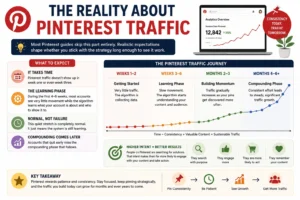
Most Pinterest guides skip this part entirely. That is a disservice because realistic expectations shape whether someone actually sticks with the strategy long enough to see it work.
Pinterest traffic does not show up in week one or even week three. During the first four to six weeks most accounts see very little movement while the algorithm figures out what the account is about and who to show the content to. That quiet stretch is completely normal and it does not mean the approach is failing. It just means the system is still learning. The accounts that quit during this period miss the compounding phase that follows.
Month one might bring a small trickle of sessions. By month four or five for an account that has stayed consistent and focused the picture can look quite different. If you are building income through freelancing or digital products alongside your blog Pinterest traffic is particularly valuable because the people who arrive searched for something specific. That intent makes them far more likely to engage with your content and take action than someone who passively clicked a link while scrolling a social feed.
Common Mistakes That Stall Pinterest Growth
The same patterns keep showing up in accounts that are not growing. Most of them are easy to fix once you know what to look for.
Using square or horizontal images shrinks your visible space in the feed. Vertical pins take up more room and that matters when someone is moving quickly through a busy home feed. Writing vague pin titles may feel creative but they give Pinterest very little context about what the content covers or who it is for. Pinning topics that have nothing to do with your niche sends a confusing signal about what your account represents and that can dampen how widely the algorithm distributes your content. The most common mistake of all is treating Pinterest like a one-time task. Upload a batch of pins and then disappear for three weeks. The platform responds to ongoing consistency. Fix these things and maintain them and the results usually follow without needing anything more complicated.
Pinterest Traffic Checklist
A quick reference covering the essentials from this guide.
| Task | Priority |
|---|---|
| Create a Pinterest Business Account | High |
| Claim and verify your website | High |
| Create 10 to 20 focused boards with keyword descriptions | High |
| Design vertical pins at a 2:3 ratio | High |
| Research keywords before designing each pin | High |
| Write natural keyword-rich pin descriptions | High |
| Schedule pins consistently using Tailwind | Medium |
| Check Pinterest Analytics once a week | Medium |
| Create multiple pin designs per blog post | Medium |
| Join active niche communities | Low |
Building Something That Lasts on Pinterest
Pinterest traffic builds in a way that most other channels simply do not match.
Paid ads stop working the moment the budget runs out. Social posts vanish within hours. Pinterest content keeps accumulating quietly in the background. A pin published this week can still surface in search results two or three years from now. Treating your Pinterest account the same way you treat your blog itself which is as something worth building carefully and patiently, rather than looking for shortcuts, pays off in a way that quick tactics rarely do. That long-game mindset connects naturally to other strategies like creating digital products with AI or building content that keeps earning attention long after it is published.
Start with two or three tightly focused boards. Publish five solid pins per week for the first month. Research keywords before designing anything. Review your analytics once a week and follow what the data tells you. The growth is slow at first. Then it compounds and it does not stop.
FAQs. Frequently Asked Questions
Q1. Is Pinterest still worth it for bloggers in 2026?
Yes. In many niches, it is genuinely underused. The platform keeps growing, and because it is built around search rather than real-time feeds older content stays relevant far longer than it would anywhere else. For bloggers covering food, personal finance, travel, DIY and online business, it remains one of the strongest free traffic sources available right now.
Q2. How many pins should I post per day?
Somewhere between 10 and 15 per day works well for most bloggers. Lead with your own content, then fill the remaining slots with quality pins from other creators in your niche. Showing up on a consistent schedule matters more than hitting a specific number every single day.
Q3. How long before Pinterest starts sending traffic?
Most accounts begin seeing consistent traffic somewhere between month two and month four, assuming regular pinning and solid keyword usage. Some niches pick up faster. The first several weeks almost always feel quiet, and that is completely expected.
Q4. Do I need a business account?
Yes. It is free, and it gives you access to analytics, Rich Pins and keyword data that a personal account simply does not offer. There is no practical reason to use a personal account if your goal is to drive blog traffic.
Q5 Can Pinterest send more traffic than Google for a blog?
It depends on the niche. For visual topics like recipes, home decor, crafts and personal finance, Pinterest can become the primary traffic source. For more technical or text-heavy subjects, Google tends to lead, but Pinterest can still contribute meaningfully as a secondary channel running alongside it.
Final Thoughts
Pinterest is one of the few traffic channels where content you publish today can still send readers to your blog years from now. Results take time to build, but the combination of solid keyword research, consistent pinning, and strong pin design can turn it into a reliable long-term source of blog traffic.
Build the foundation properly first. Create content that genuinely answers what people are searching for, organize your boards around real search terms, and let your pins compound in the background over time. That patient, consistent effort is exactly what most bloggers skip. And it is precisely what makes the ones who stay with it stand out from everyone else who gave up after a few quiet weeks.
 Topic Person